
The best habit tracker is the one whose reason to open it matches yours. Streaks (iPhone) or Loop (Android) if you want a plain streak, HabitKit if you want to see progress add up, Finch if you want something to look after, Habitica if you want a game, Beeminder if you want real money on the line, and Habit Rewards, ours, if you want coins to spend on rewards you choose.
Last updated: November 12, 2026. Each app's platforms and price model were read from its own App Store, Google Play or website page on the date in its row.
Key takeaways
- Nearly every habit tracker can add a habit, set a reminder and show a streak, so choose by what keeps you opening it: a plain streak, a progress grid, a planner, a timer, a game, a pet, real stakes or rewards.
- Streaks is Apple only and a one-time purchase ($5.99 on the US App Store); Loop is Android only, free and open source; Habo is free and open source on iPhone and Android.
- Most of the others run on both iPhone and Android: HabitKit, TickTick, Structured, Routinery, Habitica, Finch, Forest, Beeminder and Habit Rewards.
- Free tiers have limits: HabitKit is free for a few habits, Routinery for two routines (with ads), Structured keeps recurring tasks and routines in Pro, and Habit Rewards is free for three habits and three rewards.
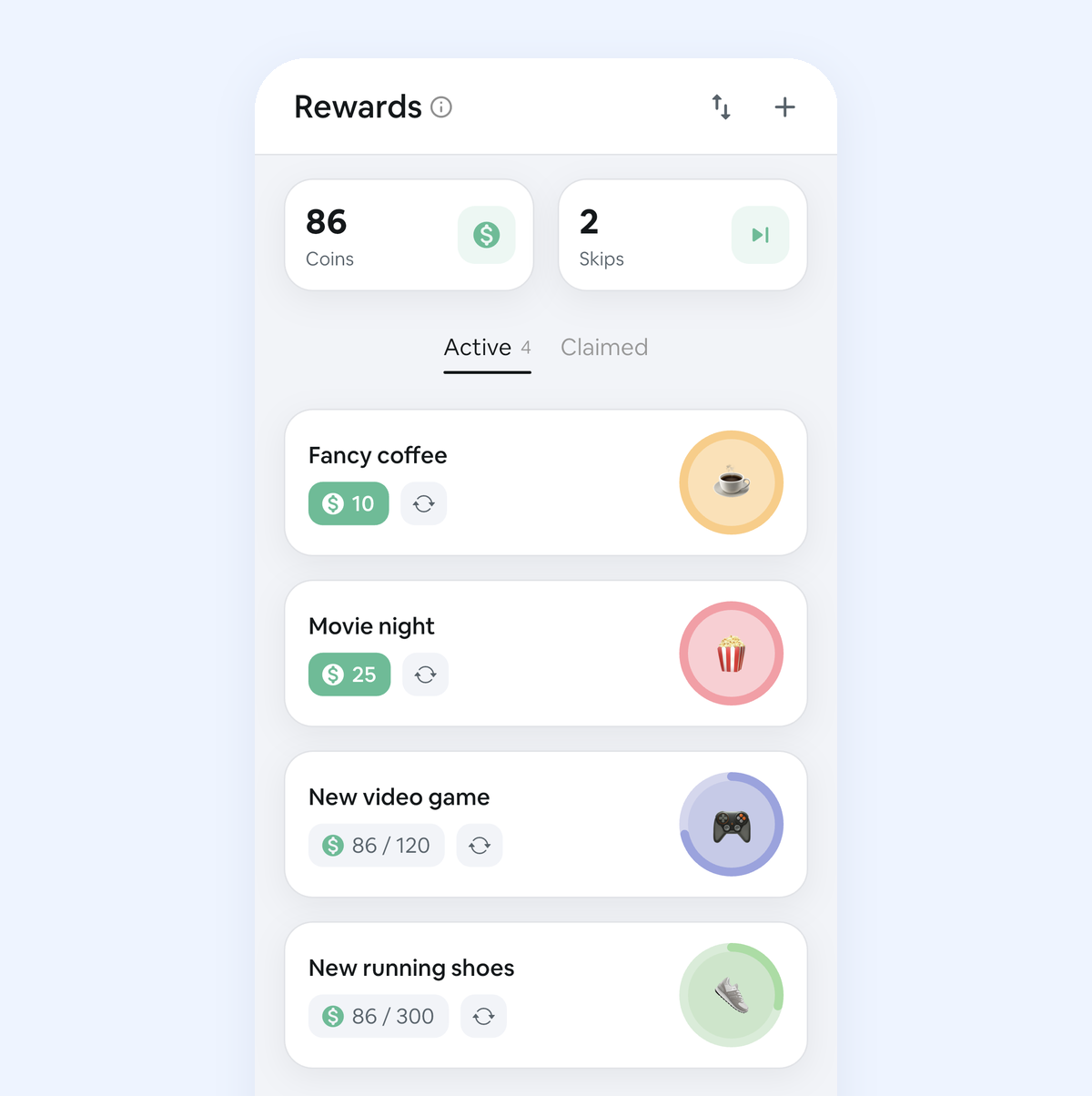
- Habit Rewards is the one built around spending: a habit earns 1, 4, 8 or 16 coins by how hard it is, and you spend the coins on a reward list you write yourself.
How do the best habit tracker apps compare?
One of the apps below is ours, Habit Rewards. We describe the others from their own pages, and each row prints the date it was checked. Ratings in the sections further down are US App Store ratings.
| App | Platforms | Price model | What it does | Last verified |
|---|---|---|---|---|
| Streaks | iPhone, iPad, Apple Watch, Mac, Apple Vision Pro | One-time purchase, no subscription ($5.99 on the US App Store) | Up to 24 tasks; can complete habits from Apple Health data | Nov 10, 2026 |
| Loop Habit Tracker | Android | Free and open source (GPLv3); no ads | A habit score that grows with each check-in | Nov 10, 2026 |
| Habo | iPhone, Android | Free and open source; optional paid sync (monthly, yearly or lifetime) | Yes or no, a number, or a skip that keeps the streak | Nov 10, 2026 |
| HabitKit | iPhone, Android | Free for a few habits; Pro by subscription or one-time lifetime purchase | A year-long grid of tiles for each habit | Nov 10, 2026 |
| TickTick | iPhone, iPad, Apple Watch, Android, computers | Free; optional Premium subscription | A to-do list and calendar with habits as one feature | Nov 10, 2026 |
| Structured | iPhone, iPad, Apple Watch, Mac, Android | Free; Pro (monthly, yearly or lifetime) adds recurring tasks and routines | Your day as a visual timeline | Nov 10, 2026 |
| Routinery | iPhone, iPad, Mac, Apple Watch, Android | Free for 2 routines, with ads; Premium removes the cap and the ads | Routines in 1 to 5 minute steps, each on a timer with a voice | Nov 10, 2026 |
| Habitica | iPhone, Android, web | Free and open source; optional subscription | Tasks earn gold, experience and items in an RPG | Nov 10, 2026 |
| LifeUp (Android) and ulives (iPhone and Android) | Android (LifeUp); iPhone, iPad and Android (ulives) | LifeUp: one-time purchase, no subscription ($4.99 on Google Play). ulives: free to start, optional Premium | Your own skills, achievements and a coin shop | Nov 12, 2026 |
| Finch | iPhone, Android | Free to start; optional Finch Plus subscription | A self-care pet you look after by looking after yourself | Nov 10, 2026 |
| Forest | iPhone, Android | Free to start; optional Forest Plus subscription | A tree that grows while you stay off your phone | Nov 10, 2026 |
| Beeminder | Web, iPhone, Android | Free for three goals (payment card required); you are charged when you derail | A goal with a red line; crossing it costs money | Nov 10, 2026 |
| Habit Rewards (ours) | iPhone, Android | Free for 3 habits and 3 rewards; Pro for more | Habits earn coins you spend on your own rewards | Nov 10, 2026 |
The rest of this page groups the same apps by what keeps people using them. Find the line that sounds like you, then read the two or three apps under it.
Which habit tracker is best for a simple streak?
Streaks (iPhone, iPad, Apple Watch, Mac; $5.99 once). Up to 24 tasks, each a big round button. Tasks can run on set days or a number of times a week, and it can complete habits by itself from Apple Health data such as steps or a workout. Rated 4.8 from more than 27,000 US App Store ratings. Not on Android: here’s what to use instead.
Loop Habit Tracker (Android; free, open source). No ads. Its habit score grows with every repetition and shrinks with every missed day, so a few missed days after a long streak don’t wipe out your progress. Not on iPhone, and the App Store apps called “Loop” are by other developers: the closest iPhone apps.
Habo (iPhone and Android; free, open source). No ads, works offline, no account needed for the core app. A day can be yes or no, a number, or a skip that doesn’t break the streak. Syncing between devices is optional, paid and end-to-end encrypted.
Which habit tracker is best for seeing progress add up?
HabitKit (iPhone and Android; free for a few habits, Pro by subscription or a one-time lifetime purchase). Each habit is a year-long grid of tiles that fills in day by day. Notes, a calendar, offline use, no account. Pro adds unlimited habits, charts and statistics, home screen widgets and up to three reminders per habit. Grids are one way to see progress; here are seven others.
Which habit tracker is best if you plan your day in a calendar?
TickTick (iPhone, iPad, Apple Watch, Android and computers; free, with Premium). A to-do list first, with calendar views, reminders and a Pomo timer; habits are one feature of it, and Premium raises the limit to 299 habits. Rated 4.9 from more than 46,000 US ratings. Good if you came from HabitNow, which is Android only: more on that.
Structured (iPhone, iPad, Apple Watch, Mac and Android; free, with Pro monthly, yearly or lifetime). Your day as a visual timeline of tasks, events and routines. Recurring tasks and routines are in Pro. Built with ADHD in mind; rated 4.8 from more than 168,000 US ratings. Coming from Tiimo? See Tiimo alternatives.
Which habit tracker is best for a routine that runs itself?
Routinery (iPhone, iPad, Mac, Apple Watch and Android; free for two routines, with ads; free vs Premium). Stack habits into a routine, split it into 1–5 minute steps, and each step runs on a timer while a voice says what’s next. Made for mornings, wind-downs and study blocks. Premium lifts the two-routine cap and removes the ads. If you’re coming from Fabulous for the morning routine, start here.
Which habit tracker is best for a game?
Habitica (iPhone, Android, web; free, optional subscription). Check off tasks and receive gold, experience and items to use in the game, and join a party to battle foes with friends by completing tasks. Open source. More in our Habitica review, apps like Habitica and Habitica vs Habit Rewards.
LifeUp (Android; a one-time purchase, $4.99 on Google Play, no subscription) / ulives (iPhone and Android, from the same team; free to start, optional Premium). A sandbox: you design your own skills, achievements, loot boxes and a shop of rewards priced in coins, so setting it up takes time. On an iPhone? See LifeUp for iPhone.
Which habit tracker is best for looking after something?
Finch (iPhone and Android; free to start, optional Finch Plus). Take care of your pet by taking care of yourself: quick self-care exercises, mood check-ins and breathing exercises grow your pet and earn rewards. Rated 4.9 from more than 770,000 US ratings. Apps like Finch.
Forest (iPhone and Android; free to start, optional Forest Plus). One habit: staying off your phone. A tree grows while you stay off it and withers if you leave early. Planting real trees with coins, through Trees for the Future, is a Forest Plus feature (up to 5 trees), and Forest Pro is no longer sold to new users. For other focus apps, see apps like Forest, for study timers you use with friends apps like YPT, and for screen time blockers apps like Opal. For study timers that give you coins, see apps like Study Bunny and apps like Focus Friend.
Which habit tracker is best for real stakes?
Beeminder (web, iPhone, Android; free for three goals, and a payment card is required). Pick a goal you can measure and Beeminder draws a bright red line. If you cross it, you pay real money: the pledge starts at $5 and rises with each derailment ($10, $30, $90 and so on) up to a cap you set, per Beeminder’s own pledge rules. You can log by hand or connect a device or app to report automatically.
Which habit tracker is best for rewards?
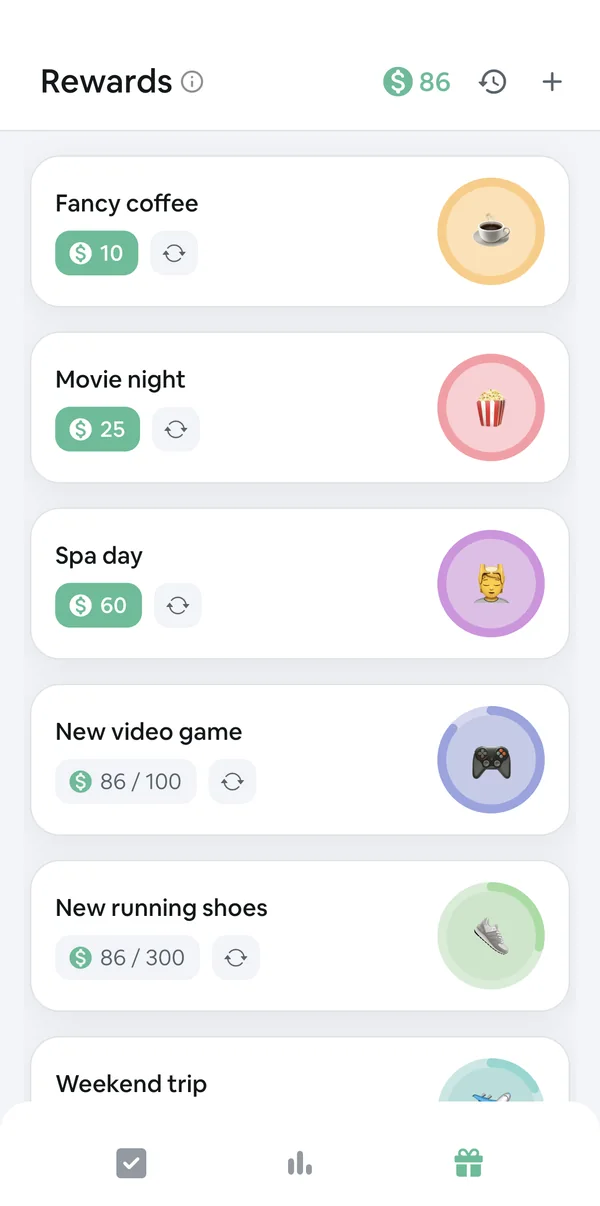
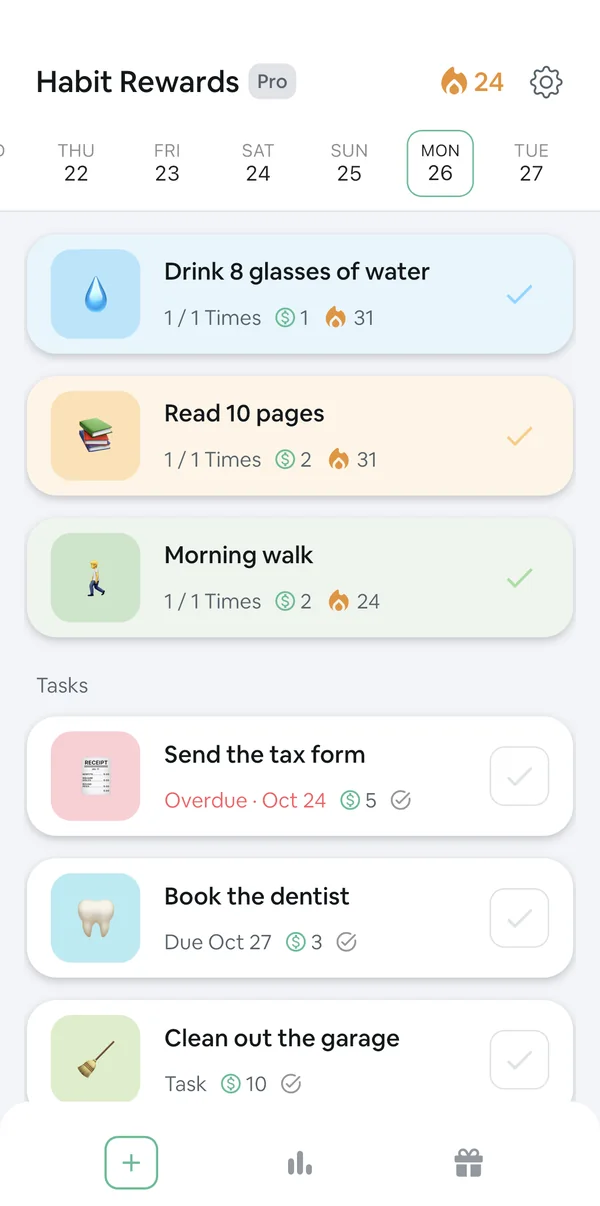
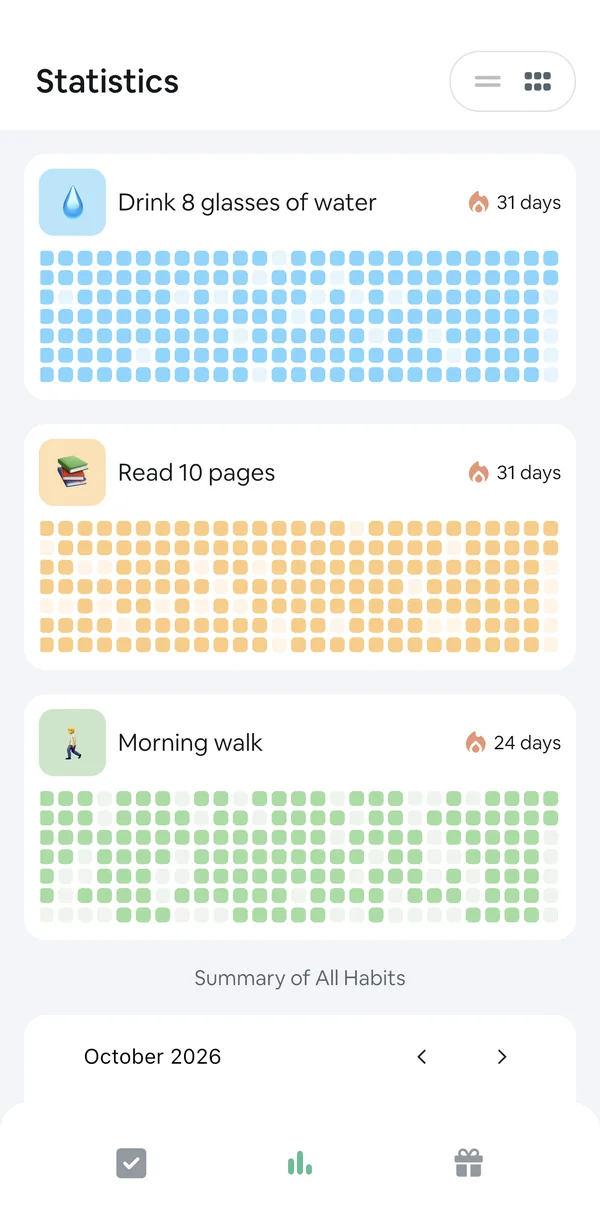
Habit Rewards (iPhone and Android; free for three habits and three rewards, Pro for more). Ours. Rated 4.7 from 123 US App Store ratings. Every habit earns coins by how hard it is (1, 4, 8 or 16), and you spend them on a reward list you write yourself, each reward with a coin price: a coffee out, a new book, a lazy Sunday. Daily, weekly and monthly habits, habits you want to quit, one-off tasks that earn coins, reminders, widgets, and a 10-coin Skip for days you can’t. How the idea works on paper: a reward chart for adults. Seven other apps where points buy rewards you choose: apps that reward you for completing habits.
How do you choose a habit tracker?
Think back to the last habit you kept for months. What kept it going? If it was the unbroken chain, pick from the first group. If it was a friend, Habitica. If it was a deadline or a cost, Beeminder. If it was the treat you’d promised yourself at the end, that’s what Habit Rewards is built around.
Read Atomic Habits? Here’s the official app and one pick per law.
Want your habits on your home screen? Here’s what each app’s widget can do.
Outgrown HabitKit’s free plan? Here are three HabitKit alternatives.
Picking for a teenager? Here are six habit tracker apps for teens. Mostly after the housework? Here are chore apps for adults.
Deciding on one app? Single-app reviews, with what’s free, what the paid plan adds and how it does on Android: Atoms, Grit, Strides, Way of Life, everyday and Habitify.
Wondering what these cost? Here are 16 habit tracker apps’ prices compared: yearly, monthly, lifetime and what each free version includes.
Then start small: three habits, one of them easy. Here are 100 habit tracker ideas with a suggested coin value for each, and free printable trackers if you’d rather start on paper.
Frequently asked questions
What is the best free habit tracker app?
Loop Habit Tracker on Android and Habo on iPhone and Android are free and open source (Habo charges only for optional sync). HabitKit is free for a few habits, Habit Rewards for three habits and three rewards, and Structured, TickTick, Routinery, Finch and Forest have free tiers with optional paid plans. Streaks is not free: it is a one-time purchase, $5.99 on the US App Store.
What is the best habit tracker app for iPhone?
It depends on what keeps you going. Streaks is a plain streak tracker for Apple devices, HabitKit shows progress as a grid of tiles, Routinery runs a routine step by step, Finch is a self-care pet, Habitica is a game, and Habit Rewards turns habits into coins you spend on rewards. Of the apps here, only Loop and LifeUp are Android only (ulives, LifeUp’s newer app, is on iPhone and Android).
What is the best habit tracker app for Android?
Loop Habit Tracker is the plain choice: free, open source and ad-free. HabitKit, Habo, Routinery, Structured, TickTick, Habitica, Finch, Forest, Beeminder and Habit Rewards all have Android apps, and LifeUp is a one-time purchase on Google Play ($4.99 in the US). Streaks is Apple only: here is what to use instead.
Which habit tracker apps have no subscription?
Streaks and LifeUp are one-time purchases, and Loop and Habo are free and open source. HabitKit and Structured sell Pro as a one-time lifetime purchase as well as by subscription. Most of the others are free to start with an optional subscription. For prices side by side, see habit tracker app prices compared and habit trackers with no subscription.
Which habit tracker apps give rewards?
Habit Rewards gives coins for every habit and task, and you spend them on a reward list you write yourself. Habitica gives gold, experience and items inside its game, LifeUp and ulives let you build a shop priced in coins, Forest gives coins for focus time, and Finch gives rewards for self-care exercises. Seven apps where points buy rewards you choose compares them.
How is Habit Rewards different from Habitica?
Habit Rewards has no game world: a habit earns 1, 4, 8 or 16 coins by how hard it is, and you spend the coins on real-life rewards you choose, such as a coffee or a lazy Sunday. Habitica turns tasks into an RPG with gold, experience, items and parties. Our Habitica vs Habit Rewards post goes through the two side by side.
Sources, checked on November 10, 2026 (the ulives row on November 12): each app's own page (linked in the table), the apps' US App Store and Google Play listings, and Beeminder's help on pledges.
Habit Rewards is free on iPhone and Android. We’re not affiliated with any of the other apps mentioned.
Try Habit Rewards: the habit tracker that rewards you
Every habit you check off earns you coins. Put a coin price on the treats you want and claim them once you've earned them. Free for three habits, on iPhone and Android.
 On a computer? Scan it with your phone to open the App Store or Google Play.

Using Notion?
Start with our free Notion habit tracker and formulas, or get the aesthetic Notion Habit Tracker template with heatmaps and streaks.
More articles you may be interested in:
- Free Notion Habit Tracker Templates (and How to Build Your Own)
- Trigger, Behavior, Reward: The Habit Loop Explained With Examples
- Advent Calendar Challenge Ideas 2026: 24 Small Habits (Free Printable)
- Holiday Run Streak 2026: Rules, Dates and a 37-Day Tracker
- Rewards for Achieving Goals: 80 Ideas, Sized to the Goal
- How to Reward Yourself Without Spending Money (and for Saving It)
Rather track it on your phone? In Habit Rewards every check-off earns coins, and you spend them on rewards you set yourself. Free on iPhone and Android for up to 3 habits.
Get the appFree habit tools and printables
Free, in your browser, no sign-up.