
HabitKit is one of the nicest-looking habit trackers around. Each habit is a year-long grid of tiles that fills in day by day, it handles goals like “3 times a week” or “20 times a month”, it works offline with no account, and it runs on iPhone and Android.
People usually go looking for an alternative for one of three reasons: the free version stops at four habits and the home-screen widgets are part of Pro, there’s no Apple Watch app, or the grid stopped being enough of a reason to keep going. Here’s a pick for each. One of them is ours, Habit Rewards; we’ve tried to describe the others fairly.
| If you want… | Try |
|---|---|
| Free widgets and no habit limit, on Android | Loop Habit Tracker |
| Apple Watch, and to pay once | Streaks |
| A reward for keeping at it, on iPhone and Android | Habit Rewards |
What HabitKit does well
Credit where it’s due: the grid is the best version of “don’t break the chain” we’ve seen, the check-off from the widget works without opening the app, and Pro comes as a subscription or a one-time lifetime purchase, which not every tracker offers. If four habits are enough and you like the grid, there’s no need to switch.
1. Loop Habit Tracker: everything free, Android only
Loop has been the go-to free habit tracker on Android since 2016. There’s no habit limit, no ads and nothing to buy, and it’s open source. It has six home-screen widgets (Checkmark, Frequency, History, Score, Streak and Target), and the Checkmark widget checks a habit off with one tap. Instead of a grid it gives each habit a strength score that grows with every check-in and dips when you miss, so one bad day doesn’t erase months.
Good for: Android users who want HabitKit’s features without paying.
Less good if: you’re on iPhone: Loop is Android only (here are the closest picks for iPhone).
2. Streaks: Apple Watch and a one-time price
Streaks is an Apple Design Award winner that runs on iPhone, iPad, Apple Watch and Mac. You can complete tasks from its widgets and from your watch, and it has more widget styles than most (Tasks, Dots, Stats and more). It’s a one-time $5.99 with no subscription, and it keeps you to a short list of tasks on purpose.
Good for: iPhone and Apple Watch users who’d rather pay once than subscribe.
Less good if: you need Android, or you liked HabitKit’s year-at-a-glance grid.
3. Habit Rewards: a reason beyond the grid
This one’s ours. A full grid is satisfying for a while; then for a lot of people it stops mattering. Habit Rewards adds a reward to every check-off: each habit pays coins by how hard it is (1, 4, 8 or 16), and you spend them on a reward list you write yourself, like a coffee out or an evening of gaming. Every habit still has a calendar of done, skipped and failed days, current and longest streaks, and a completion rate.
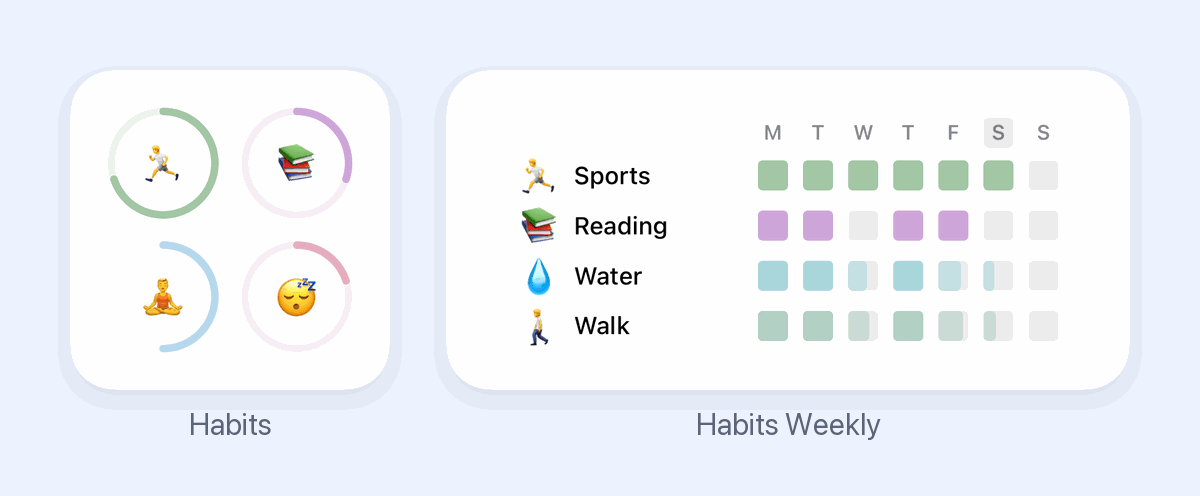
It has two home-screen widgets, both free: a progress ring for each habit today (on iOS 17 or later, tap a ring to check the habit off), and a weekly grid with one row per habit. It’s on iPhone and Android, free for three habits, with a Pro subscription for more.
Good for: people for whom seeing the progress isn’t enough, and anyone who already treats themselves and would rather earn it.
Less good if: you want a year-long grid per habit, or an Apple Watch app.
Which one?
On Android, Loop gives you nearly everything HabitKit Pro does for free. On iPhone with an Apple Watch, Streaks is the pay-once classic. And if what you’re missing isn’t a feature but a reason, put a reward at the end of the streak: that’s what Habit Rewards is for.
More comparisons: what each habit tracker’s widget can do, 7 ways to see your progress, and the whole field grouped by what motivates you: the best habit tracker apps.
Habit Rewards is free on iPhone and Android. We’re not affiliated with HabitKit or the other apps mentioned; features and prices change, so check each app’s listing before you buy.
✅ Try Habit Rewards: the habit tracker that pays you
Every habit pays coins by how hard it is (1, 4, 8 or 16). Write your own reward list, put a coin price on each treat, and claim it once you've earned it.
- Daily, weekly and monthly habits, plus one-off tasks that pay coins
- Reminders, streaks and home-screen widgets
- A 10-coin Skip for the days you can't
- Free for three habits, on iPhone and Android

On a computer? Scan the code with your phone (it opens the App Store or Google Play), or get it on the App Store.

Using Notion?
Start with our free Notion habit tracker and formulas, or get the aesthetic Notion Habit Tracker template with heatmaps and streaks.
More articles you may be interested in:
Free habit tools and printables
Free, in your browser, no sign-up.