Notion
Notion Template
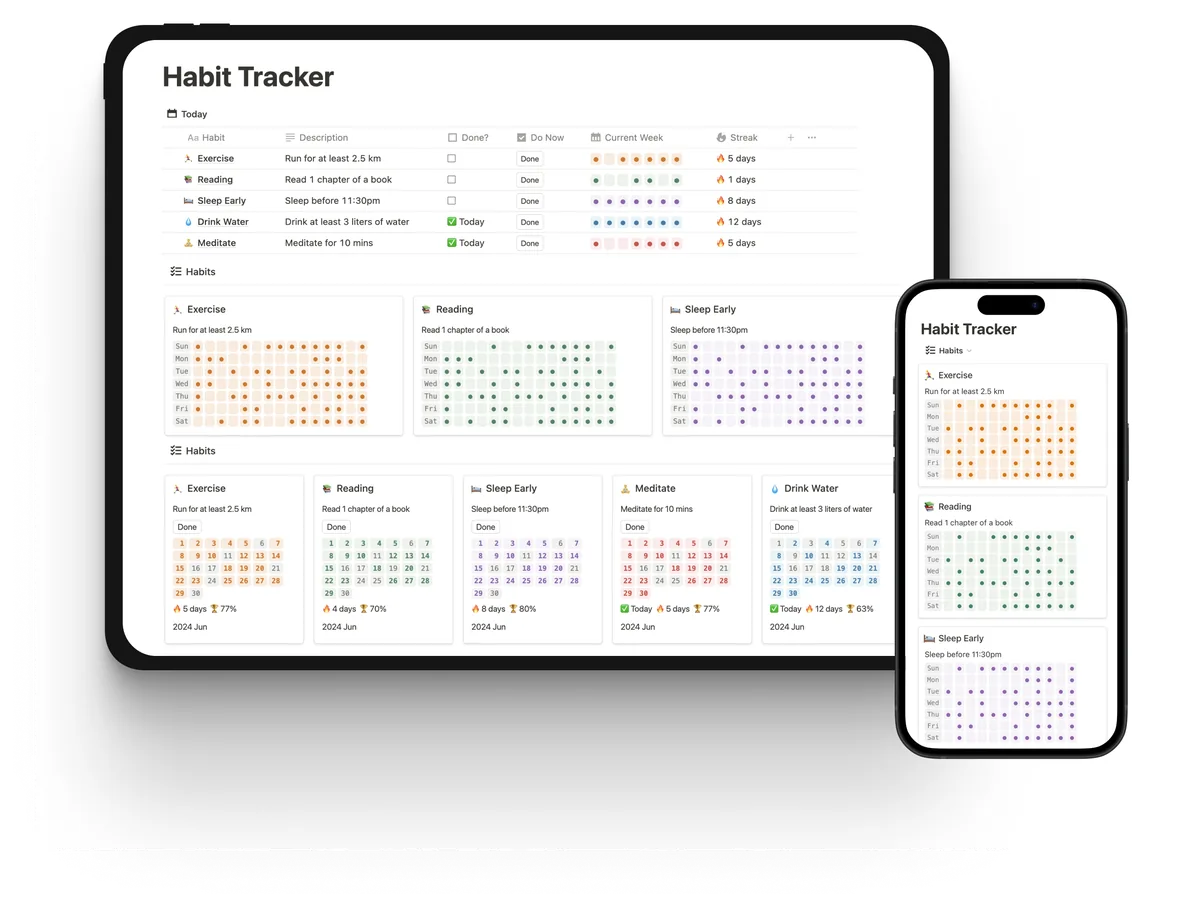
The Notion habit tracker template on a tablet and a phone: today's habits with a Done button, yearly heatmaps and monthly calendars

Aesthetic Notion Habit Tracker TemplateWith Heatmaps and Streaks

Make Habit Tracking a Visual Delight in Notion.

Trusted by 1288 happy users.

Want to start simple? Get our free Notion habit tracker with a progress bar, or build your own with our formulas.

The Notion habit tracker template on a tablet and a phone: today's habits with a Done button, yearly heatmaps and monthly calendars

Packed with Nice Features.

The ultimate Notion Habit Tracker you need to build your habits.

Everything You Need to Track Habits in A Single Page
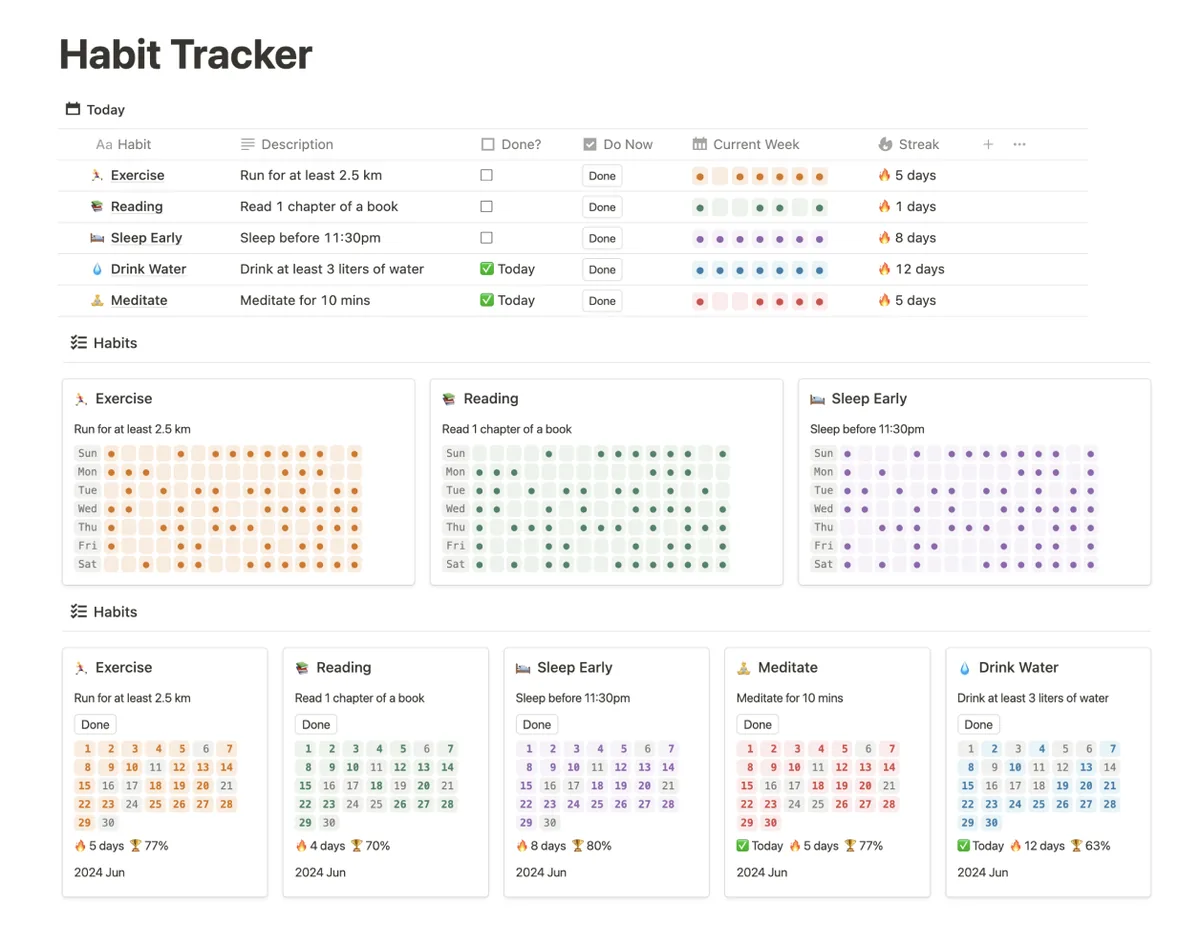
Notion habit tracker dashboard: today's habits with Done buttons, current-week dots and streaks, a yearly heatmap per habit and monthly calendars with completion rates

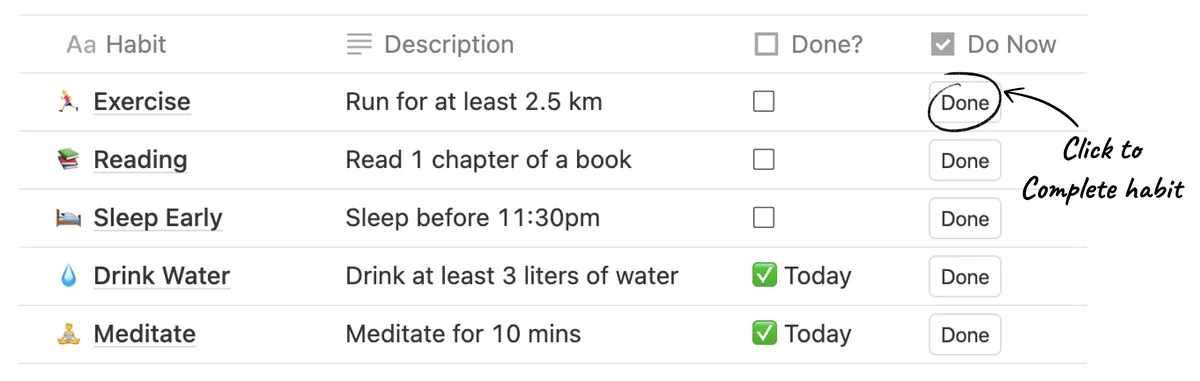
Track Daily Habits

  • Know your daily habits status at a glance

  • Simply click a button to complete the habit

  • Automatically renew for a new day

Today's habit list in Notion: click Done next to a habit to check it off

Visualize Progress in Weekly, Monthly, and Yearly
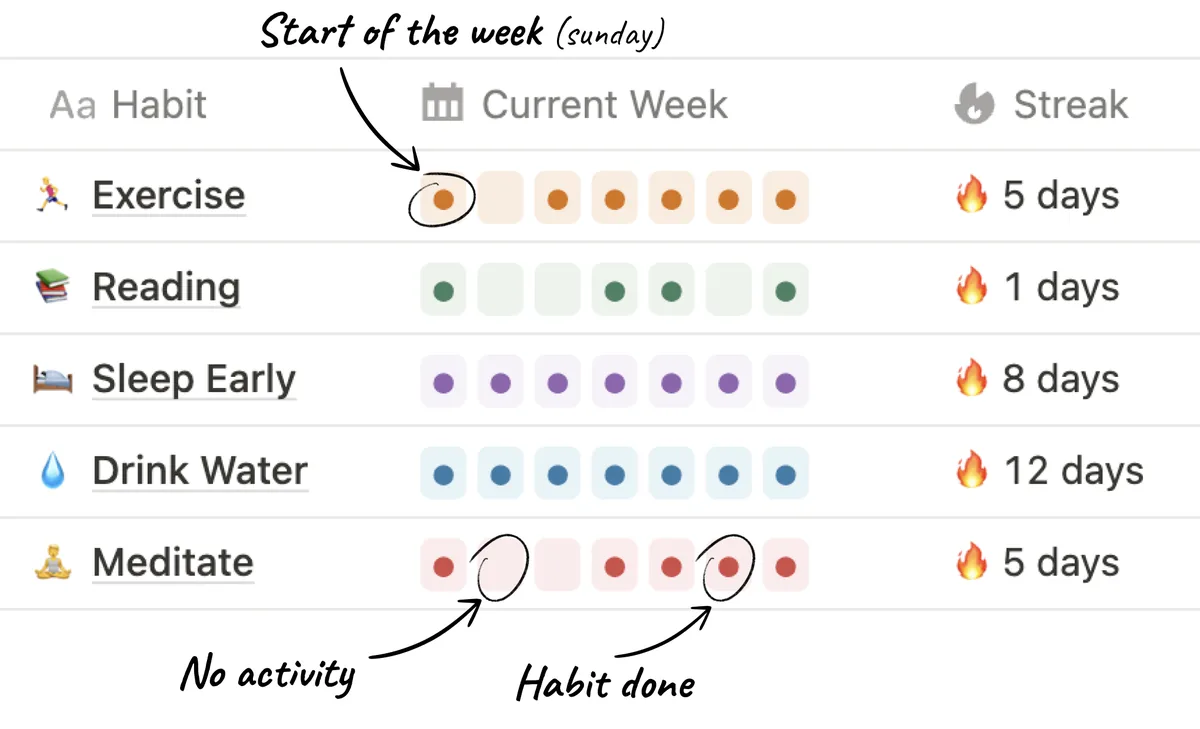
Weekly view: one dot per day for each habit, Sunday to Saturday, with the current streak

Weekly View of Habits

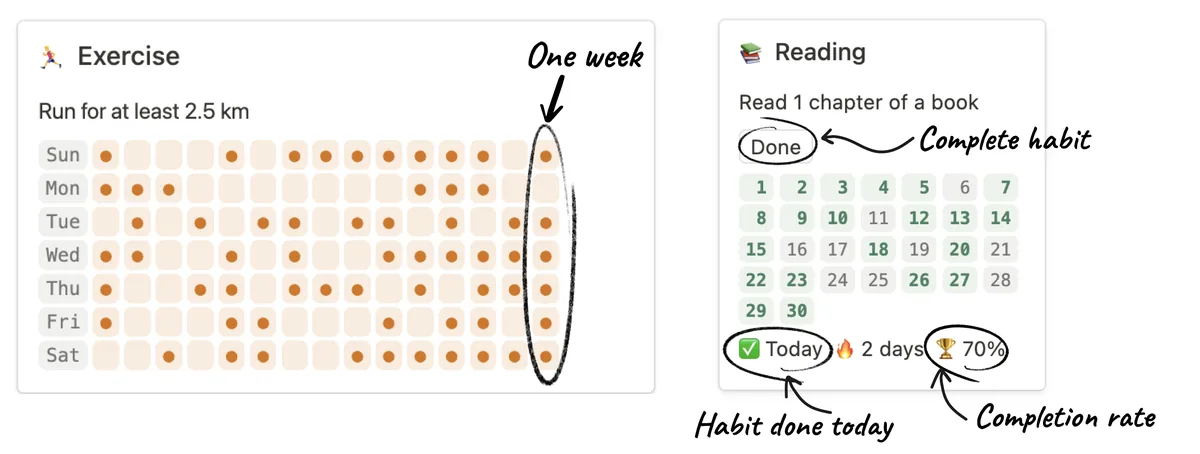
Yearly habit heatmap in Notion (one column per week) next to a monthly calendar card with streak and completion rate

Heatmap & Monthly View of Habits

Integrate with Notion Calendar

Once you click "Done" button to complete a habit, it automatically creates an entry on your Notion calendar
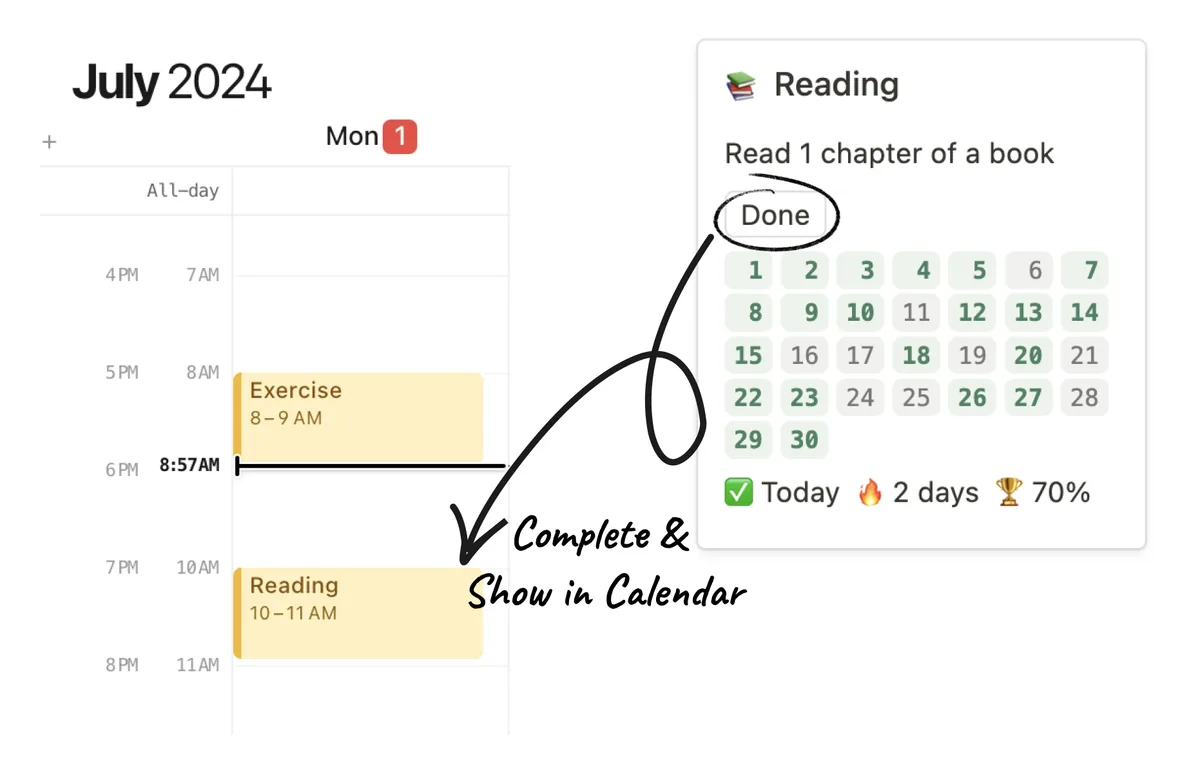
Clicking Done on a habit adds an entry to Notion Calendar

Dark Mode

Looks stunning also in dark mode.
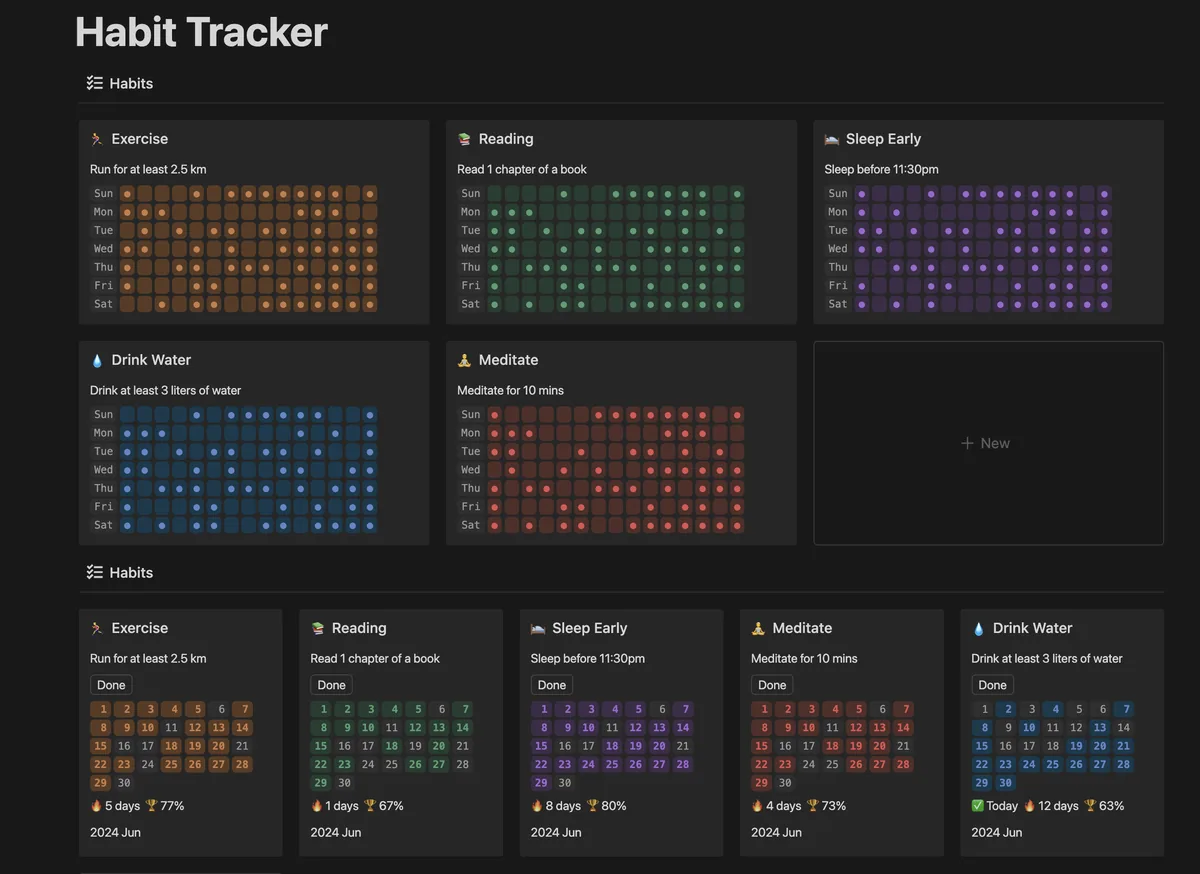
The Notion habit tracker in dark mode: colored heatmaps and monthly calendars on a dark background

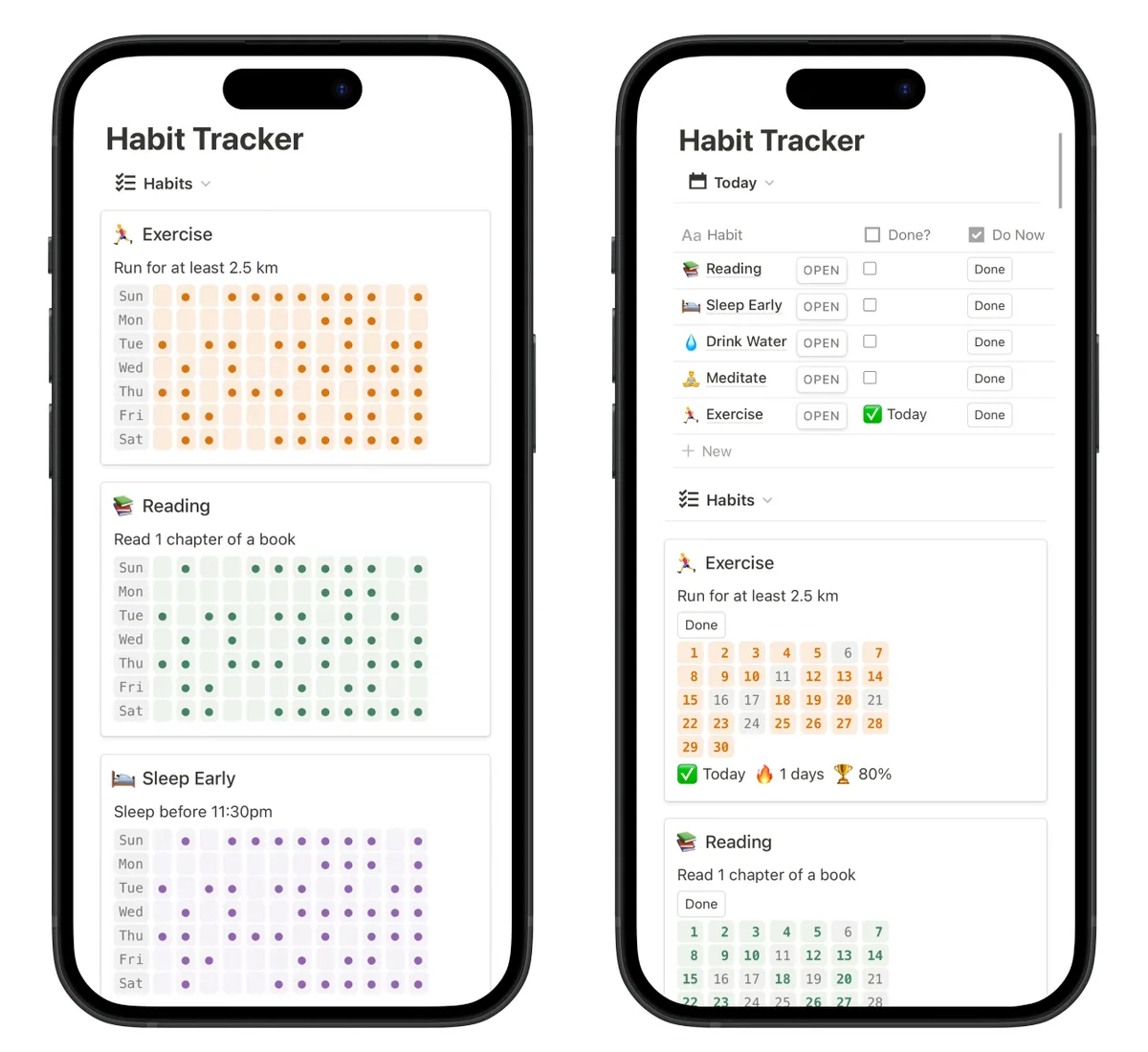
Mobile Friendly

The Notion habit tracker in the Notion mobile app: heatmaps on one screen, today's list and monthly calendars on another

Customizable

  • Get extra motivation with streaks

  • Do not like streak? simply turn it off in your charts

Support

Pay Once, Use Forever

Unlock lifetime access with a one-time payment.

Starter

$13.9

One-time payment

  • All-in-one Dashboard

  • Weekly View

  • Monthly Calendar View

  • Streaks

  • Completion Rate

Premium

$14.9 $19.9

One-time payment, $14.9 with the code NOTION5OFF

  • All-in-one Dashboard

  • Weekly View

  • Monthly Calendar View

  • Heatmap

  • Streaks

  • Completion Rate

  • Lifetime Updates

Five Ways to Visualize Your Habits in Notion

Each view answers a different question. Here is when to look at which one.

1. Yearly heatmap: "Am I consistent?"

One square per day, darker on the days you did the habit. A year of squares shows at a glance whether a habit is part of your life or something you did for two weeks in January. Look at it once a month, not every day: its job is to show the long view. (Premium)

2. Weekly view: "What's left this week?"

Your habits as rows and the seven days as columns. This is the view for Sunday planning and for catching a habit you have skipped three days in a row while there is still time to save the week.

3. Monthly calendar: "Which days slip?"

A calendar with your check-ins on it. Patterns show up here that a streak hides: workouts that always fall off on Fridays, reading that only happens on weekends. Fix the day, not your willpower.

4. Streaks: "Don't break the chain."

A running count of days in a row. Streaks are great motivation for some people and stressful for others, so the template lets you turn them off in your charts.

5. Completion rate: "Am I getting better?"

The share of planned days you actually did the habit. It forgives a missed day the way a streak doesn't: 80% for a month is a good month, even if the streak reset twice.

Starter or Premium?

Both are a one-time payment, not a subscription, and both include the all-in-one dashboard, the weekly view, the monthly calendar, streaks and completion rates. Premium adds the yearly heatmap and lifetime updates. Starter is $13.9; Premium is $19.9, or $14.9 with the code NOTION5OFF at checkout.

Not sure Notion is for you? Start with our free Notion habit tracker (a progress bar per habit), or build your own with the formulas in that guide.

Questions

Is this a subscription?

No. You pay once and duplicate the template into your own Notion workspace.

Does it work on my phone?

Yes. The layout works in the Notion mobile app, and dark mode looks as good as light mode.

How do I check off a habit?

Click the button next to the habit. The day's list resets on its own for the next day, and each check-in also adds an entry to your Notion Calendar.

Is there a free version?

Yes. Our Notion Habit Tracker With Progress Bar is pay-what-you-want: enter $0 and it's free. It has one-click Done buttons, a daily progress bar and weekly and monthly views, but no heatmap or streaks. Our guide to free Notion habit tracker templates compares it with two other free ones and shows the formulas to build your own.

How do I get started?

The template comes with a starter guide. If you get stuck, email us at hi@habitrewards.me.

Want rewards for your habits too?

Our app, Habit Rewards, rewards you with coins for every habit and lets you spend them on rewards you choose, with reminders and streaks on iPhone and Android. Free to start.

About Me

Hello! My name is Nick. I'm the founder, engineer, and designer behind Habit Rewards.

Driven by a passion for personal development and productivity, I aim to create tools that unlock your full potential.

I've discovered how powerful consistent habits can be in transforming lives and achieving success. That's why I designed these Notion templates: to help you reach your goals more efficiently and effectively.

Join me on this journey and Let's unlock our full potential together!

Track Daily Habits,
Achieve Your Goals Today

See how your habits progress and stick to your habits.

Trusted by 1288 happy users.