
Focus Friend, by Hank Green, made focusing feel like looking after a pet. You start a timer, a little Bean keeps you company, and when the session ends the Bean gives you prizes to decorate its room. Stop early and the Bean is really sad. It also has a Deep Focus Mode that locks distracting apps, break timers for the Pomodoro method and a Live Activity on your lock screen. It came out in 2025 and has a 4.8 rating from about 9,400 US ratings.
People go looking for more like it for a few reasons. Some have decorated every corner of the room. Some want to focus next to other people. Some want the same cozy feeling for the rest of their day, not just for work sessions. And some realize the treat that keeps them going is one for themselves, not for the Bean.
Here are six apps, picked by what you liked about Focus Friend. One of them is ours, Habit Rewards; we’ve tried to describe the others fairly.
| If you liked… | Try |
|---|---|
| The companion who pays you for focus | Study Bunny |
| The cozy room, with real people in it | Focustown |
| Locking your phone while you work | Forest |
| Focusing with a group of friends | Focus Traveller |
| Looking after a pet, all day | Finch |
| The prizes, but for you | Habit Rewards |
1. Study Bunny: the original study companion
Study Bunny is the app most people compare Focus Friend to. You time your studying, a bunny keeps you company, and you earn coins to spend on items and music in its store. Hit pause when your focus slips and it offers motivational advice. It also has a to-do list, flashcards and a study tracker, which Focus Friend doesn’t.
It’s free with ads, on iPhone and Android, with a 4.7 rating from about 21,800 US ratings. The iPhone app hasn’t been updated since December 2024.
Good for: students who want flashcards and a study log next to their companion.
Less good if: you want an app that’s actively updated. More options in apps like Study Bunny.
2. Focustown: a cozy room with real people
Focustown puts you in a low-poly cafe or library next to real people who are studying at the same moment. Focus sessions earn coins that you spend on accessories for your character, and you can start sessions with your own friends. It’s from 2026, free on iPhone and Android, with a 4.8 rating from about 8,500 US ratings.
Good for: people who work better at a library than at home.
Less good if: you want a quiet app with nobody else in it.
3. Forest: put the phone down
Forest is where the idea started. You start a session and a tree grows; leave the app and it withers. Deep Focus blocks the apps you choose during a session, and Time Guard blocks them on a schedule. You can plant with friends, and the community has funded more than two million real trees. It’s free on iPhone and Android (the free version includes app blocking), with a 4.8 rating from almost 50,000 US ratings and an optional Forest Plus subscription.
Good for: people whose real problem is picking up the phone.
Less good if: you want a character to look after. Forest has trees, not pets. More options in apps like Forest.
4. Focus Traveller: climb with your friends
In Focus Traveller, the longer you focus, the higher your traveller climbs. You can invite up to 10 friends into a travel group and focus together in real time, choose a countdown or an open-ended stopwatch, and start sessions from a Home Screen widget. It’s free on the iPhone, with a 4.9 rating from about 4,000 US ratings.
Good for: small groups of friends who want to keep each other going.
Less good if: you want a room to decorate.
5. Finch: a pet for your whole day
Finch isn’t a focus timer. It’s a self-care pet: you look after a little bird by looking after yourself, and quick check-ins and self-care goals give it energy. If what you loved about Focus Friend was the warm feeling of looking after something, Finch brings it to the rest of your day. It’s free on iPhone and Android, with a 4.95 rating from about 768,000 US ratings.
Good for: people who want gentle, low-pressure motivation for everyday habits.
Less good if: you need a timer for long work sessions. More in apps like Finch.
6. Habit Rewards: prizes for you
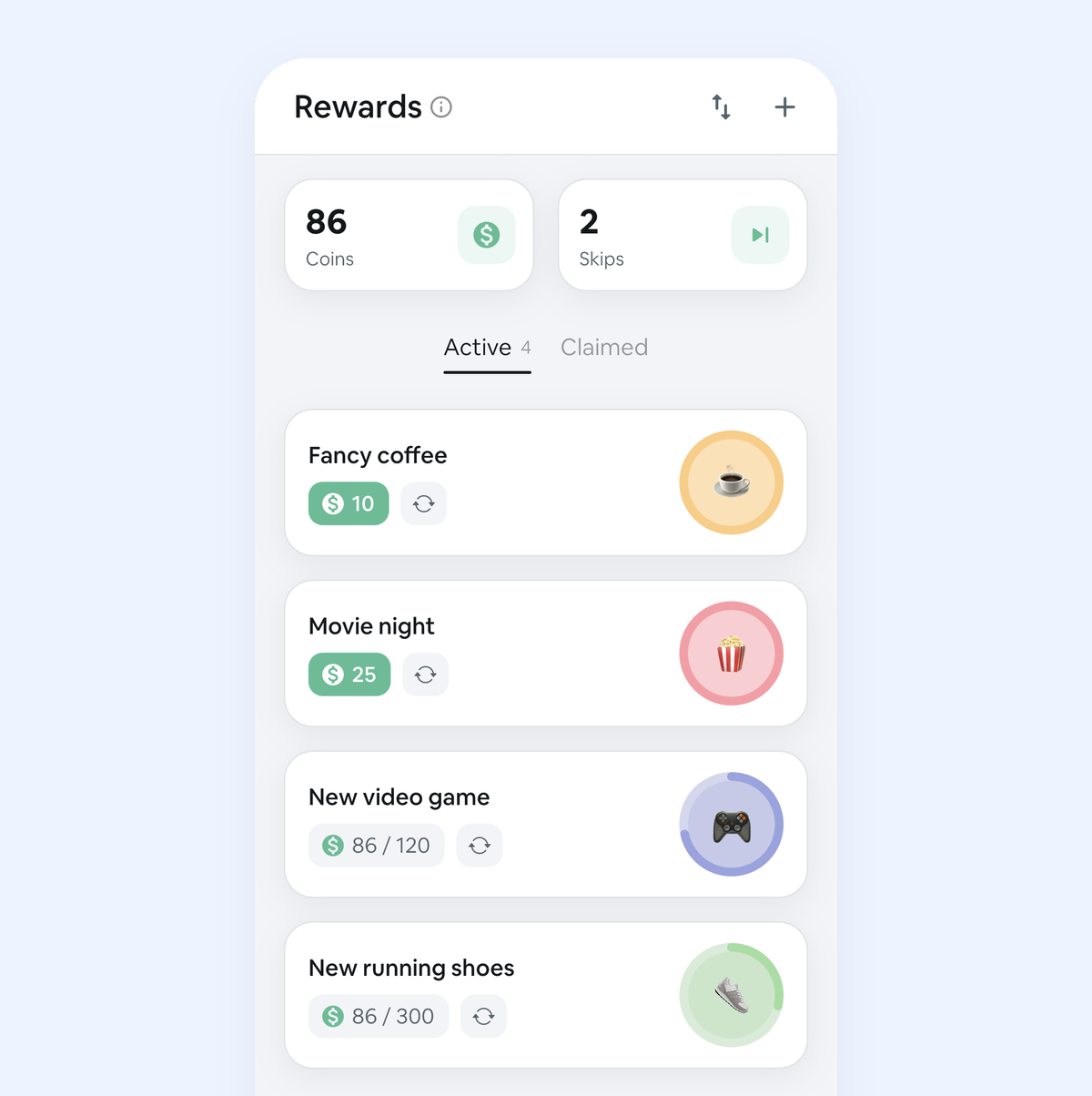
This one’s ours. Focus Friend gives the Bean prizes; Habit Rewards gives them to you. You write a list of rewards, like a bubble tea, a new game, an episode of your show or a Saturday off, and give each one a coin price. You add “Focus” or “Study” as a daily habit, with a goal such as 50 minutes a day, and it pays coins by how hard it is (1, 4, 8 or 16). One-off work like “finish the history essay” goes in as a task and pays coins once. When your balance covers a reward, you claim it.
If you need a day off, a Skip costs 10 coins and keeps your streak alive. It’s on iPhone and Android, free for three habits, with a Pro subscription for more.
Good for: people who already treat themselves and want the treat to be earned. Our guide to rewarding yourself for studying shows the system on paper first.
Less good if: you want a timer. Habit Rewards doesn’t have one. Plenty of people keep the Bean for the session and check the habit off in Habit Rewards afterwards.
How to pick
Think about which part of Focus Friend kept you coming back. If it was the companion, try Study Bunny. If it was the cozy room, Focustown, where the room has people in it. If it was the app lock, Forest. If it was working alongside someone, Focus Traveller. If it was the feeling of looking after something, Finch. And if you want the prizes to be yours, give your focus a price: that’s what Habit Rewards is for. A focus timer and a habit tracker work fine side by side.
The whole field, grouped by what motivates you: the best habit tracker apps.
FAQ
Is Focus Friend free? Yes, Focus Friend is free to download on iPhone and Android. In the US App Store, Focus Friend Pro costs $3.99 a month, $19.99 a year or $39.99 once, and Bean packs and skins cost $2.99 to $5.99 (checked October 26, 2026).
Is Focus Friend on Android? Yes, Focus Friend is on Google Play as well as the App Store. Study Bunny, Focustown, Forest, Finch and Habit Rewards are on both too.
What are free apps like Focus Friend? All six here are free to download. Study Bunny is the closest (a companion that pays coins for focus, with ads), and Forest’s free version includes app blocking.
Which Focus Friend alternative lets me spend coins on real rewards? Habit Rewards: a focus or study habit pays coins each time you check it off, and you spend them on rewards you set yourself, like an evening off or a new book. More apps that work this way: apps that reward you for completing habits.
Habit Rewards is free on iPhone and Android. Focus Friend is made by Hank Green’s team; we’re not affiliated with it or with the other apps mentioned.
✅ Try Habit Rewards: the habit tracker that pays you
Every habit pays coins by how hard it is (1, 4, 8 or 16). Write your own reward list, put a coin price on each treat, and claim it once you've earned it.
- Daily, weekly and monthly habits, plus one-off tasks that pay coins
- Reminders, streaks and home-screen widgets
- A 10-coin Skip for the days you can't
- Free for three habits, on iPhone and Android

On a computer? Scan the code with your phone (it opens the App Store or Google Play), or get it on the App Store.

Using Notion?
Start with our free Notion habit tracker and formulas, or get the aesthetic Notion Habit Tracker template with heatmaps and streaks.
More articles you may be interested in:
- Free Notion Habit Tracker Templates (and How to Build Your Own)
- Trigger, Behavior, Reward: The Habit Loop Explained With Examples
- Rewards for Achieving Goals: 80 Ideas, Sized to the Goal
- How to Reward Yourself Without Spending Money (and for Saving It)
- Non-Food Rewards for Adults: 75 Ideas (and How to Stop Rewarding Yourself with Food)
- How to Reward Yourself for Hard Work: 50 Ideas by Effort
Rather track it on your phone? In Habit Rewards every check-off earns coins, and you spend them on rewards you set yourself. Free on iPhone and Android for up to 3 habits.
Get the appFree habit tools and printables
Free, in your browser, no sign-up.