GitHub-Style Habit Tracker: A Contribution Graph for Your Habits
A GitHub-style habit tracker shows a year of habits as a grid of small squares, one per day, that turn green when you do the habit, like the contribution graph on a GitHub profile. This free tool draws one graph for each habit and one for all of them, counts your streaks and check-ins, and downloads the graph as a PNG. No sign-up; everything is saved in your browser.
Last updated: November 5, 2026
Key takeaways
- It is free and needs no account. You can track up to six habits, and everything is saved in this browser only, with no sync between devices.
- Each habit has its own graph: a square is dark green when you did the habit that day and grey when you didn't. The All habits graph is shaded by how many habits you did, from light green for one to the darkest green for four or more.
- A streak counts today once you've marked it, or runs to yesterday if you haven't yet. The tool also shows your longest streak and your active days in the last year.
- Click a square to mark a day done and click again to undo it. Future days are locked, and "Download as PNG" saves the graph you're looking at.
- Squares show consistency but don't reward it. For reminders, coins and rewards on your phone, see the Habit Rewards app below.
Click a square to mark that day done; click again to undo. On "All habits", a day's colour is how many habits you did. Future days are locked.
This graph lives in this browser only. To keep it on your phone with reminders, get Habit Rewards (free on iPhone and Android): every habit there gets its own tile grid, and each check-off earns coins toward rewards you set.
Your habits
What is a GitHub-style habit tracker?
A GitHub-style habit tracker is a habit tracker drawn as a contribution graph: one square per day, grey when the habit wasn't done and green when it was. GitHub's own graph counts the commits, pull requests and issues on a profile (GitHub's explanation); a habit version counts the days you did the habit instead. Like GitHub's, the graph here has 53 columns of weeks and 7 rows of days, ending with the week that holds today.
Why does a contribution graph help you keep a habit?
It shows a year of days at once, so an empty week stands out and a long run of green is satisfying in a way a number isn't. That's the same pull as the "don't break the chain" calendar, with two things added: you see the whole year, and a day isn't just done or not done, it can be a bit greener.
That second part is why the "All habits" graph is worth a look. A day where you did one of four habits still shows up as light green instead of a gap, so a bad day still counts for something. It's a more forgiving picture than a single streak that resets to zero.
How do you use this tracker?
- Name your habits. Rename the three starter habits in the "Your habits" card under the graph, or add up to six.
- Pick a graph. Each habit has its own tab. Once you have two or more habits, an "All habits" tab appears.
- Mark days done. Click a square, or press "Mark today done" for today. Click a done square again to undo it. Future days are locked.
- Read the stats. Your current streak, longest streak this year and active days sit under the graph.
- Download it. "Download as PNG" saves the graph you're looking at, with its check-in total.
Keep the list short: three to five habits is plenty. Check in at the same time every day; the outlined square is today.
What does each square mean?
| Graph | What a square means | Use it for |
|---|---|---|
| One habit | Done (dark green) or not (grey) | A daily habit you want an unbroken run of: writing, a walk, no social media before noon |
| All habits | How many of your habits you did that day (1 = lightest, 4 or more = darkest) | Seeing whether your weeks are getting fuller, without one miss erasing a streak |
The "All habits" graph goes fully dark at four habits. The current streak counts today once you've marked it, or runs to yesterday if you haven't yet.
Can you use GitHub's own graph to track habits?
You can, with a daily commit, but it isn't built for it. GitHub's graph shows commits, pull requests and issues, and its contributions are timestamped in UTC rather than your local time zone (GitHub's docs), so a late entry can land on another day. A habit tracker like this one marks a day done in one click and counts the streak for you.
Is a GitHub-style tracker a good habit tracker? Pros and cons
Pros
- A year at a glance: you see whether a habit is part of your life or something you did for two weeks in January.
- Partial credit: the All habits graph keeps a day with one of four habits done as light green, not a gap.
- Free and private: no sign-up, and nothing leaves your browser.
Cons
- No reminders and no sync: it lives in one browser and starts over if you clear the site data, use private browsing or switch browsers.
- Nothing rewards a green square: after a few weeks the squares stop feeling new, and on the day you miss, the gap is the most visible thing on the screen.
Verdict: it is good at showing consistency and weak at rewarding it. Two things help: plan your misses, and give the run something to earn. Decide in advance what counts as a rest day. In a study that followed 96 people forming a daily habit (Lally and colleagues, 2010), missing one day didn't materially affect the habit; what matters is the next day. James Clear's rule for it: never miss twice.
Can you use a GitHub-style tracker on your phone? This tool vs the Habit Rewards app
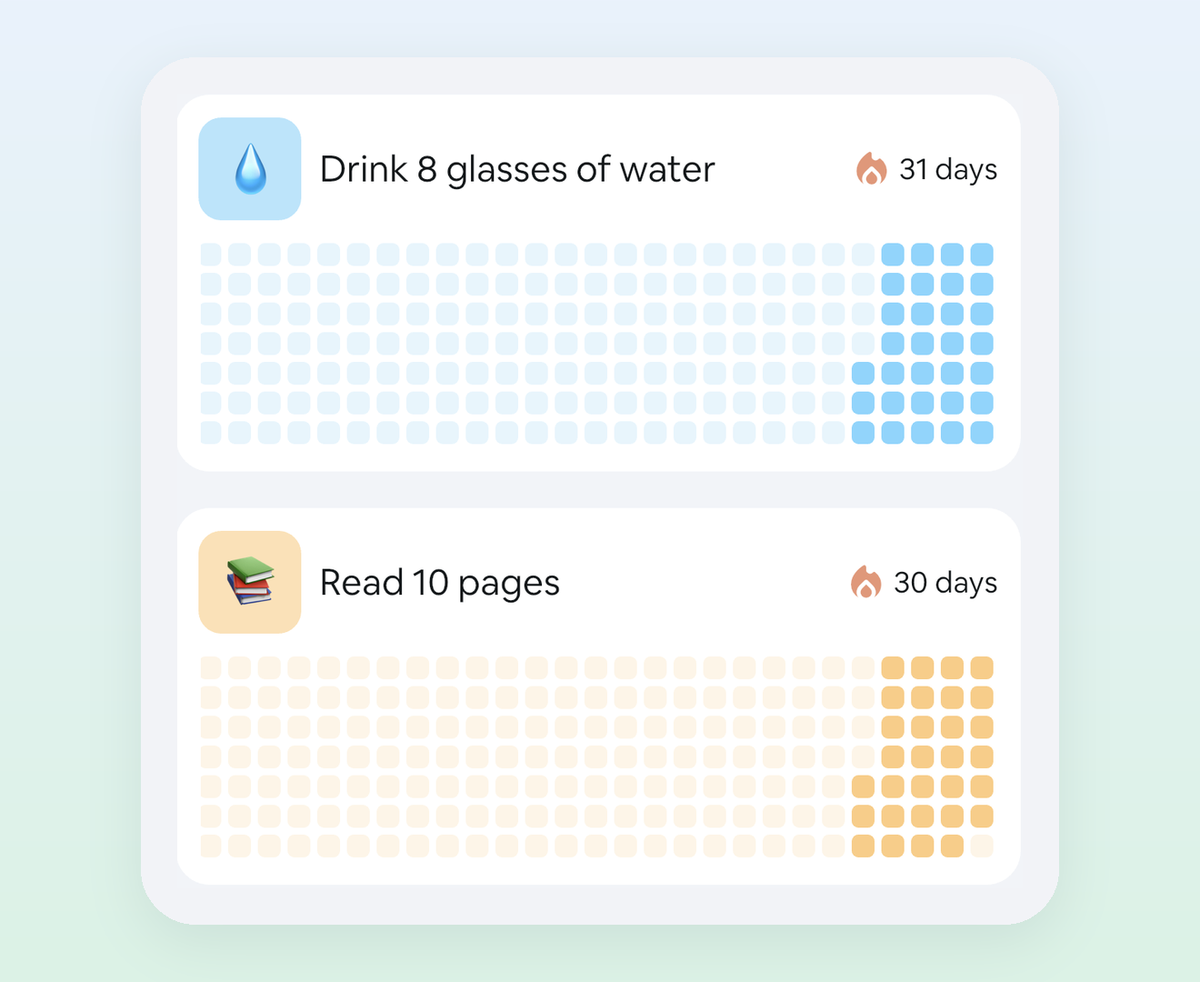
This page is a browser tool. For your phone, Habit Rewards shows each habit as a tile grid that fills in as you check it off, and adds the part a graph lacks: coins you earn for every check-off and spend on rewards you price yourself.
| This tool | Habit Rewards app | |
|---|---|---|
| Where it runs | Your browser, on one device | iPhone and Android |
| The graph | A full year, one graph per habit plus an All habits graph | A tile grid per habit that fills in as you check it off |
| Reminders | No | Yes, at the time you choose, plus home-screen widgets |
| Rewards | No | Each check-off earns 1, 4, 8 or 16 coins by difficulty, spent on rewards you price yourself |
| A day you can't make it | The square stays grey | A 10-coin Skip keeps the streak |
| Price | Free, no sign-up | Free for up to 3 habits and 3 rewards, Pro removes the limits |
FAQ
What is a GitHub-style habit tracker?
A habit tracker drawn like GitHub's contribution graph: one square per day, grey when the habit wasn't done and green when it was, laid out in 53 weekly columns. This page is a free one: a graph for each habit and an All habits graph, in your browser, with no sign-up.
Is this GitHub-style habit tracker free?
Yes. It is free and needs no sign-up, account or download. Everything you enter stays in your browser's storage on the device you use.
How many habits can I track?
Up to six. Each gets its own graph, and once you have two or more an All habits graph appears, shaded by how many habits you did each day.
What do the shades of green mean?
On a single habit's graph a square is grey when you didn't do the habit and dark green when you did. On the All habits graph the shade is the number of habits you did that day: light green for one, darker for two and three, and the darkest green for four or more.
Does it save my progress, and does it sync to my phone?
It saves in your browser's local storage on the device you use, with no account. Clearing the site data, private browsing or switching browsers starts you over, and nothing syncs between devices. Use Download as PNG to keep a copy of a graph. For habits on your phone with reminders, use an app.
How is the streak counted?
The current streak counts the days in a row you've marked, ending today if you've marked today or yesterday if you haven't yet, so it isn't lost before the day is over. On the All habits graph it counts days in a row with any habit done. The tool also shows your longest streak and your active days in the last year.
Can I use GitHub's own contribution graph to track habits?
You can, with a daily commit, but it isn't built for it. GitHub's graph shows commits, pull requests and issues, and timestamps them in UTC rather than your local time zone. A habit tracker like this one marks a day done in one click and counts streaks for you.
Is there a GitHub-style habit tracker app for iPhone or Android?
This page is a browser tool. For your phone, Habit Rewards shows each habit as a tile grid that fills in as you check it off, with reminders on iPhone and Android, and adds coins you earn for every check-off and spend on rewards you set. It is free for up to 3 habits.
Is this affiliated with GitHub?
No. GitHub is a trademark of GitHub, Inc., and this page isn't affiliated with or endorsed by it. The graph only borrows the look of a contribution graph.
More ways to see your progress
Other ways to see your progress, and when each backfires: habit visualization. For one habit and a single streak, use the streak tracker; for a printable year, the yearly habit tracker.