
A habit tracker works best when you see it without thinking about it, and nothing is easier to see than your home screen. A good widget does two jobs: it reminds you what’s left today, and it lets you check a habit off with one tap, without opening the app.
Not every habit tracker’s widget does the second part. Some open the app when you tap them, and some put widgets behind a paid plan. Here are six habit trackers and what their widgets actually do, checked against each app’s listing, help pages or source code in October 2026. One of them is ours, Habit Rewards; we’ve tried to describe the others fairly.
| App | Phones | Check off from the widget? | Widgets free? |
|---|---|---|---|
| Streaks | iPhone (plus iPad, Watch, Mac) | Yes | Yes (paid app, $5.99 once) |
| HabitKit | iPhone and Android | Yes | No, widgets come with Pro |
| Loop Habit Tracker | Android only | Yes, with the Checkmark widget | Yes, everything is free |
| Habitica | iPhone and Android | Android yes; on iPhone the widget opens the app | Yes |
| Habitify | iPhone and Android | No, a tap opens the app to log it | Not confirmed |
| Habit Rewards | iPhone and Android | iPhone (iOS 17+) yes; on Android a tap opens the app and checks it off | Yes |
1. Streaks: the widget is the app
Streaks has the most widget styles of the six: Tasks, Dots, Stats, App Icon and Dice, and since September 2026 an extra-large size. You can complete tasks straight from the widget, and on Apple Watch too. It’s a one-time $5.99 purchase with no subscription.
Good for: iPhone and Apple Watch users who want to pay once.
Less good if: you use Android: Streaks is Apple only.
2. HabitKit: the grid on your home screen
HabitKit shows each habit as a year-long grid of tiles, and its widgets put that grid (or a compact list of habits) on your home screen. You can check habits off without opening the app. It’s on iPhone and Android, free for up to four habits, but the home-screen widgets are part of Pro (a subscription or a one-time lifetime purchase). If that’s a dealbreaker, here are HabitKit alternatives.
Good for: people who are motivated by seeing the chain fill in.
Less good if: you want widgets without paying.
3. Loop Habit Tracker: six free widgets on Android
Loop is free, open source and ad-free, and it has six widgets: Checkmark, Frequency, History, Score, Streak and Target. The Checkmark widget is the one you tap to mark a habit done; the others show its strength score, history and streak. Everything is free.
Good for: Android users who want lots of widget options and no cost.
Less good if: you’re on iPhone: Loop is Android only (here are the closest picks for iPhone).
4. Habitica: tap-to-score on Android, links on iPhone
Habitica turns your habits into a role-playing game. On Android its widgets go furthest of any game-style tracker: buttons to score a habit up or down, lists of your dailies and to-dos, your avatar and your stats. On iPhone the widgets show your dailies, to-dos and stats, but tapping one opens the app. Habitica is free, with an optional subscription.
Good for: people who like the game, especially on Android.
Less good if: you want to tick things off on an iPhone home screen.
5. Habitify: good-looking, but a tap opens the app
Habitify has single-habit and habit-list widgets in several sizes on iPhone, and streak and progress widgets on Android. Its support team says tapping a widget opens the app to a quick-log screen, so it takes a second step to check a habit off. Habitify is free to start, with paid plans for more.
Good for: people who use Habitify across phone, watch and computer.
Less good if: one-tap check-offs are the reason you want a widget.
6. Habit Rewards: a ring per habit, and coins for each one
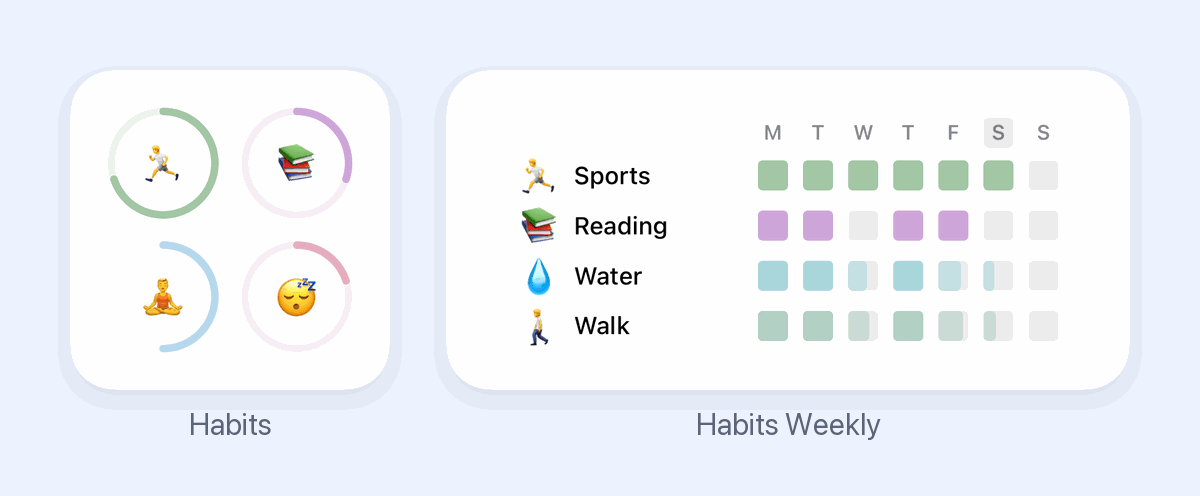
This one’s ours. Habit Rewards has two home-screen widgets on both iPhone and Android, and both are free:
- Habits (small or medium) shows a progress ring for each habit today. On iOS 17 or later, tap a ring to check the habit off without opening the app; on Android, the tap opens the app and checks it off.
- Habits Weekly (medium or large) shows one row per habit with how each day of this week went. Habits you do several times a day, like 8 glasses of water, fill in part of the square.
On iOS 17 or later you can pick which habits each widget shows: touch and hold the widget and tap Edit Widget.
What makes it different is what a check-off is worth. Every habit pays coins (1, 4, 8 or 16, by how hard it is), and you spend them on rewards you write yourself, like a coffee out or an hour of gaming. So the ring on your home screen isn’t only a reminder: it’s money in the jar.
There’s no lock-screen or Apple Watch widget yet. The app is free for three habits, with a Pro subscription for more.
Good for: people who want the widget to give them a reason, not just a record.
Less good if: you want lock-screen widgets or Apple Health to tick habits off for you.
Which one?
If you’re on iPhone and want to pay once, Streaks has the best widgets. On Android, Loop gives you the most for nothing. HabitKit is the nicest-looking grid if you’ll pay for Pro. And if what you need isn’t a reminder but a reason, put the habits next to a reward: that’s what Habit Rewards is for.
Whichever you pick, put the widget on your first home screen, not the second, and start with three habits. Need ideas? Here are 100 habit tracker ideas, and the whole field grouped by what motivates you: the best habit tracker apps.
Habit Rewards is free on iPhone and Android. We’re not affiliated with any of the other apps mentioned; features and prices change, so check each app’s listing before you buy.
✅ Try Habit Rewards: the habit tracker that pays you
Every habit pays coins by how hard it is (1, 4, 8 or 16). Write your own reward list, put a coin price on each treat, and claim it once you've earned it.
- Daily, weekly and monthly habits, plus one-off tasks that pay coins
- Reminders, streaks and home-screen widgets
- A 10-coin Skip for the days you can't
- Free for three habits, on iPhone and Android
On a computer? Scan the code with your phone (it opens the App Store or Google Play), or get it on the App Store.

Using Notion?
Start with our free Notion habit tracker and formulas, or get the aesthetic Notion Habit Tracker template with heatmaps and streaks.
More articles you may be interested in:
Free habit tools and printables
Free, in your browser, no sign-up.