
Most habit apps are made for one of two people. Kids’ apps, like Joon, assume a parent sends the tasks and hands out the points; Joon itself is built for ages 6 to 12. Adult apps assume you want charts, stats and a productivity system. Teens tend to land in the gap: too old to have a parent ticking boxes for them, and not looking for a spreadsheet.
The apps that work for teens have two things in common. A teen can set them up alone, and finishing something gets you something you can see the same day. Here are six, grouped by what that something is. One of them is ours, Habit Rewards; we’ve tried to describe the others the way their own users would.
At a glance
| App | What a done habit gets you | Best for | Platforms | Price (US) |
|---|---|---|---|---|
| Finch | Energy and Rainbow Stones for a pet bird | Self-care and mood | iPhone, Android | Free; optional Finch Plus |
| Forest | A tree grows while you stay off your phone | Studying without scrolling | iPhone, Android | Free; optional subscription |
| Study Bunny | Coins for a bunny’s store | Timing study sessions | iPhone, Android | Free |
| Habitica | Gold and XP for an RPG avatar | Gamers, and friends doing it together | Web, iPhone, Android | Free; optional subscription. Rated 12+ on the App Store |
| Streaks | A streak that keeps growing | A short daily checklist | iPhone, iPad, Apple Watch | $5.99 once |
| Habit Rewards | Coins you spend on real rewards you set | Chores, homework and habits that pay for something real | iPhone, Android | Free for three habits (tasks don’t count); optional Pro |
Prices are the US App Store list prices on 2026-10-22.
1. Finch: look after a bird, look after yourself
Finch gives you a small bird to care for. Set gentle goals (drink water, go outside, journal), and completing them gives your bird energy for its adventures and Rainbow Stones you spend on clothes and furniture for it. It leans on check-ins and reflection as much as goals, and it’s kind when you miss a day. Free, with an optional Finch Plus subscription.
Good for: self-care, stress and low-energy days.
Less good if: you want to track homework or chores. The rewards stay with the bird.
2. Forest: put the phone down
Forest is a focus timer. Start a session and a tree grows; leave the app early and it withers. Finished sessions build up a forest and unlock new trees and sounds, and the Forest community has funded real trees through Trees for the Future. On iPhone you can also set Allow Lists that block distracting apps during a session. Free to download, with an optional subscription and in-app purchases.
Good for: study sessions and anyone whose real habit problem is the phone itself.
Less good if: you want to track habits across the day. Forest only counts focus time.
3. Study Bunny: a timer with a bunny
Study Bunny keeps you company while you study. Time your session, earn coins, and spend them on items and music in its store; hit pause when you lose focus and it offers some encouragement. It also has a to-do list, flashcards and a study tracker. Free.
Good for: students who like a cute, low-pressure study buddy.
Less good if: you want habits outside of studying, or rewards that aren’t for the bunny. (We compared apps like Study Bunny separately.)
4. Habitica: habits as an RPG
Habitica turns habits, daily tasks and to-dos into a role-playing game. Doing them earns Gold and XP for your avatar; skipping dailies costs health. You can join a party with friends and fight quests together, so your missed dailies hurt everyone, and you can add your own real rewards to buy with Gold. Free, with an optional subscription; the App Store rates it 12+.
Good for: gamers, and friend groups who want to keep each other going.
Less good if: you want something quick. There’s a lot of game to learn.
5. Streaks: a clean daily checklist
Streaks is a simple, well-designed habit checklist for Apple devices: up to 24 tasks a day, and the goal is to keep each streak going. It has reminders, widgets, Apple Health links and “negative” tasks for habits you want to break. It’s a one-off $5.99 with no subscription, and it’s iPhone, iPad and Apple Watch only.
Good for: teens on iPhone who want a few daily habits and nothing else.
Less good if: you’re on Android, or a streak number doesn’t motivate you for long.
6. Habit Rewards: earn coins, spend them on real rewards
This one is ours. Each habit pays the coins you give it (1, 4, 8 or 16, or your own number): 1 for making your bed, 8 for an hour of revision. One-off jobs like “finish the history essay” or “clean my room” go in as tasks and pay too. Then you make your own reward list with a coin price for each: an hour of gaming, a bubble tea, a new game you save up for. Claim one when your balance covers it.
You can start without making an account, keep up to three habits for free (tasks don’t count), get reminders, check things off from a home-screen widget, and skip a day without breaking a streak. iPhone and Android, with an optional Pro subscription for more.
Good for: teens who already reward themselves (gaming, snacks, going out) and want those rewards to be earned.
Less good if: a parent wants to see progress. It’s a personal app: there’s no parent dashboard or shared view.
What about Joon?
Joon is a good app for younger kids: a parent sends “quests”, the child earns coins to look after a virtual pet. But it’s made for ages 6 to 12 and needs a parent on the other end, and many teens find it too young. If that’s where you’re coming from, we wrote about what older kids and adults use instead.
For parents: agree the rewards, don’t run the app
Teens stick with a system they set up themselves. If you want to help:
- Agree on the reward list together. Screen time, a later weekend curfew, a takeaway night, money toward something bigger. Write down the price of each one in coins.
- Let them price their own habits. The ones they dread should pay the most. A teen who sets “revise for 30 minutes = 8 coins” owns that number.
- Check the balance, not every tick. Once a week is enough. The point is that they’re running it.
- Pay rewards on time. If a reward is earned and it doesn’t happen, the system is over.
Prefer paper? Our free printable habit tracker and chore chart maker both have space for a reward next to each goal.
Habit ideas for teens
Start with three. More than that and the first busy week breaks them.
| Habit | Coins |
|---|---|
| Make your bed | 1 |
| Phone out of the bedroom at night | 4 |
| 30 minutes of revision | 8 |
| Exercise or practice (sport, music) | 8 |
| Read for 20 minutes | 4 |
| Clean your room (once a week) | 16 |
| Reward | Price |
|---|---|
| An hour of gaming | 10 coins |
| A bubble tea or snack out | 20 coins |
| A late night on the weekend | 40 coins |
| Money toward a new game | 150 coins |
More reward ideas: 70 ways to reward yourself and how to reward yourself for studying.
FAQ
What is the best habit tracker app for teens? It depends on what you want to change. For self-care and mood, Finch. For studying without your phone, Forest. For a game with friends, Habitica. For a few daily habits on iPhone, Streaks. If you want habits and chores to pay for real rewards you choose, Habit Rewards.
Is there a free habit tracker app for teens? Finch, Forest, Study Bunny and Habitica are free to download with optional upgrades. Habit Rewards is free for three habits plus unlimited one-off tasks. Streaks costs $5.99 once.
Is there a reward app for teens? Yes. Habitica and Habit Rewards both let you set real rewards and pay for them with points you earn. Finch, Forest and Study Bunny reward you inside the app: items for a pet, new trees, things for the bunny.
Do teens need an account? Habit Rewards can be used without one; you can sign in later to back up and sync. Habitica needs an account. Check each app’s sign-up before you start.
✅ Try Habit Rewards: the habit tracker that pays you
Every habit pays coins by how hard it is (1, 4, 8 or 16). Write your own reward list, put a coin price on each treat, and claim it once you've earned it.
- Daily, weekly and monthly habits, plus one-off tasks that pay coins
- Reminders, streaks and home-screen widgets
- A 10-coin Skip for the days you can't
- Free for three habits, on iPhone and Android
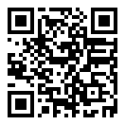
On a computer? Scan the code with your phone (it opens the App Store or Google Play), or get it on the App Store.

Using Notion?
Start with our free Notion habit tracker and formulas, or get the aesthetic Notion Habit Tracker template with heatmaps and streaks.
More articles you may be interested in:
- Free Notion Habit Tracker Templates (and How to Build Your Own)
- Trigger, Behavior, Reward: The Habit Loop Explained With Examples
- How to Reward Yourself for Good Habits (Without Undoing Them)
- Chore Apps for Adults: 6 Compared by What Keeps You Cleaning
- Apps That Reward You for Completing Habits: 8 With a Real Reward System
- Habit Tracker Like Duolingo: How to Get the Streak Effect for Any Habit
Rather track it on your phone? In Habit Rewards every check-off earns coins, and you spend them on rewards you set yourself. Free on iPhone and Android for up to 3 habits.
Get the appFree habit tools and printables
Free, in your browser, no sign-up.