
Tiimo was Apple’s iPhone App of the Year for 2025, and it earned it. It’s a visual planner built with neurodivergent people in mind: a color-coded schedule you rearrange by dragging, a to-do list you can brain-dump into, an AI co-planner that helps you sort and prioritize, a calm countdown timer, and widgets that keep the next thing in view. It syncs with Apple Calendar and Reminders, and you can share up to five profiles with family. It’s on iPhone, Android and the web, with a 4.6 rating from more than 20,000 US ratings.
Still, ADHD brains differ, and a planner is only one kind of help. Some people want their whole day on a timeline. Some need someone to walk them through a routine step by step. Some get stuck before they start because the task is too big. And some can plan just fine but need a reason to actually do it.
So here are four apps, picked by what you need. One of them is ours, Habit Rewards; we’ve tried to describe the others fairly.
| If what you need is… | Try |
|---|---|
| Your whole day on one timeline | Structured |
| A routine that runs itself, step by step | Routinery |
| Help breaking a big task into small ones | Goblin Tools |
| A reward for getting through it | Habit Rewards |
1. Structured: the day as a timeline
Structured lays your tasks, events and routines out on a single visual timeline, so you can see how the day actually fits together. The free version is generous: the drag-and-drop timeline, an inbox for quick ideas, subtasks with notes, a Pomodoro focus timer, Live Activities, widgets, and a dyslexia-friendly font. Pro adds calendar and Reminders sync, recurring tasks and routines, AI day planning, and Replan, which moves the tasks you missed. It has a 4.8 rating from more than 160,000 US ratings and runs on iPhone, iPad, Apple Watch, Mac and Android.
Good for: people who like Tiimo’s visual day but want more of it free.
Less good if: a full timeline feels like pressure rather than relief.
2. Routinery: routines that walk you through
Routinery is for the parts of the day that happen in the same order every time: mornings, bedtime, study blocks, workouts, medication. You stack small habits into a routine and split it into steps of one to five minutes. Each step runs on its own timer, and a voice tells you what comes next, so there’s nothing to decide halfway through. It has a 4.7 rating from about 18,000 US ratings and is on iPhone and Android.
Good for: people who lose the thread in the middle of a routine.
Less good if: your days don’t have a fixed order to automate.
3. Goblin Tools: when the task is too big to start
Goblin Tools is a set of small helpers for when something feels overwhelming. Magic ToDo breaks a task into bite-sized steps. Compiler turns a messy brain dump into a list of actions. Estimator gives a rough idea of how long things will take. Others rewrite a message in the tone you need, or help you compare options. It’s made with neurodivergent people in mind. The iPhone app costs $1.99, it’s on Android too, and there’s a website, goblin.tools.
Good for: the moment before starting, when you can’t see the first step.
Less good if: you want a planner or reminders. It’s a toolbox, not a schedule.
4. Habit Rewards: a reward for getting it done
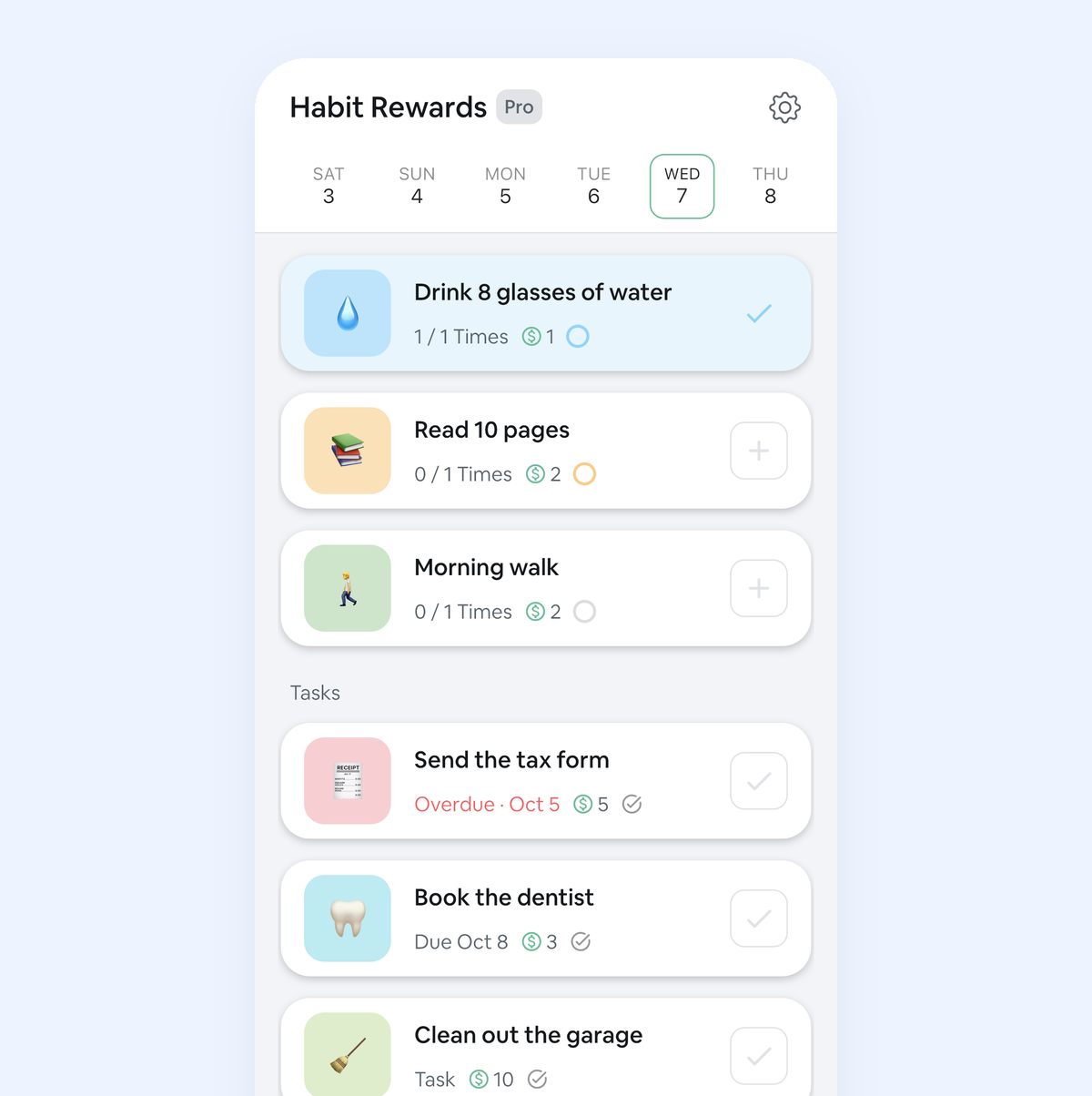
This one’s ours, and it isn’t a planner. It’s for the other half of the problem: doing the thing once you know what it is. Every habit pays coins by how hard it is (1, 4, 8 or 16). One-off to-dos go in as tasks and pay coins too, so “call the dentist” can be worth something. You write your own list of rewards, like a coffee out, a new game, an episode of your show or an afternoon off, each with a coin price, and claim one when your balance covers it. A reward you’ve chosen and priced yourself gives you something specific to look forward to, which is often what an ADHD brain needs to get going.
If you just don’t check a habit off, nothing is taken away (coins only come off when you mark a habit as failed yourself), and if you need a day off, a Skip costs 10 coins and keeps your streak alive. It’s on iPhone and Android, free for three habits, with a Pro subscription for more.
Good for: people who can plan the day but struggle to follow through, and anyone who already bribes themselves with treats.
Less good if: you want a visual schedule or a timer. We don’t have either, and plenty of people use Habit Rewards next to a planner like Tiimo or Structured.
How to pick
Ask where your day usually falls apart. If it’s not knowing what’s next, try Structured. If it’s in the middle of a routine, Routinery. If it’s before you even start, Goblin Tools. And if you know exactly what to do but can’t make yourself do it, give the doing a payoff: that’s what Habit Rewards is for. These apps work well together, so you don’t have to pick just one.
More for ADHD: how to set up an ADHD habit tracker, Joon for adults and the dopamine menu builder. The whole field, grouped by what motivates you: the best habit tracker apps.
Habit Rewards is free on iPhone and Android. Tiimo is a product of tiimo ApS; we’re not affiliated with it or with the other apps mentioned.
✅ Try Habit Rewards: the habit tracker that pays you
Every habit pays coins by how hard it is (1, 4, 8 or 16). Write your own reward list, put a coin price on each treat, and claim it once you've earned it.
- Daily, weekly and monthly habits, plus one-off tasks that pay coins
- Reminders, streaks and home-screen widgets
- A 10-coin Skip for the days you can't
- Free for three habits, on iPhone and Android

On a computer? Scan the code with your phone (it opens the App Store or Google Play), or get it on the App Store.

Using Notion?
Start with our free Notion habit tracker and formulas, or get the aesthetic Notion Habit Tracker template with heatmaps and streaks.
More articles you may be interested in:
Free habit tools and printables
Free, in your browser, no sign-up.