
Opal is one of the best-known screen time apps. You choose the apps that eat your day, and Opal limits or blocks them, with real-time data on where your time goes, plus leaderboards and rewards to keep you going. It has a 4.7 rating from about 90,000 US ratings and is on iPhone and Android. It’s free to download, but the paid plans add up: in the US App Store they include $19.99 a month and $99.99 a year (checked October 26, 2026).
That price is the most common reason people look elsewhere. Others want something gentler than a hard block, or something that works with how they already study and work. And some realize they don’t want to ban their favorite apps at all, just to earn them.
Here are six options, picked by what you want from Opal. One of them is ours, Habit Rewards; we’ve tried to describe the others fairly.
| If you want… | Try |
|---|---|
| Opal’s tools, free | ScreenZen |
| A pause before you open an app, not a wall | one sec |
| Scheduled blocks plus a focus timer, free | Forest |
| Blocks and limits with less setup | ClearSpace |
| Nothing new to install | Screen Time / Digital Wellbeing |
| Screen time you earn instead of ban | Habit Rewards |
1. ScreenZen: the free one
ScreenZen gives you most of what people pay Opal for, for free. You can add a wait before a distracting app opens (and make the wait longer each time), get interrupted after a few minutes of scrolling, set a goal per app and block it when you hit the limit, strict-block apps by time range or number of opens, and lock its settings so you can’t switch it off in a weak moment. Its only in-app purchases are optional tips from $5 to $40. It’s on iPhone and Android, with a 4.9 rating from about 52,000 US ratings.
Good for: anyone who wants Opal’s controls without a subscription.
Less good if: you want polished reports and leaderboards.
2. one sec: a pause, not a block
one sec adds a short pause before a distracting app opens, so you choose whether you really want it. The idea is that a delay changes the habit more gently than a hard block, and it says app usage drops by 57% on average, citing research with the Max Planck Institute and others. It’s free to download on iPhone and Android, with a 4.8 rating from about 24,000 US ratings.
Good for: people who open Instagram on autopilot and don’t want to be locked out.
Less good if: you need a hard wall during exams.
3. Forest: free scheduled blocks, plus a timer
Forest is best known as a focus timer: a tree grows while you stay off your phone. Its free version also includes Time Guard, which blocks the apps you choose on a schedule (“no social media 9 to 5”), and Deep Focus, which blocks them during a focus session. Forest Plus is an optional subscription. It’s on iPhone and Android. More in apps like Forest.
Good for: people who also want a focus timer for study or work.
Less good if: you only want blocking and no game around it.
4. ClearSpace: blocks and limits
ClearSpace blocks distracting apps while keeping the useful ones, with time limits to stop doomscrolling. It’s free to download on iPhone and Android, with a 4.7 rating from about 8,900 US ratings.
Good for: people who want a straightforward blocker.
Less good if: you’re looking for the cheapest option; check its plans in the App Store first.
5. Your phone’s own tools
Before paying for anything, try what’s built in. On iPhone, Screen Time sets daily limits per app or category and can schedule downtime. On Android, Digital Wellbeing has app timers and a focus mode. They’re free and already installed. Their weakness is that they’re easy to dismiss: “ignore limit” is one tap away, which is why so many people move to an app with stricter locks.
Good for: a first try at cutting back.
Less good if: you always tap “ignore limit”.
6. Habit Rewards: earn your screen time
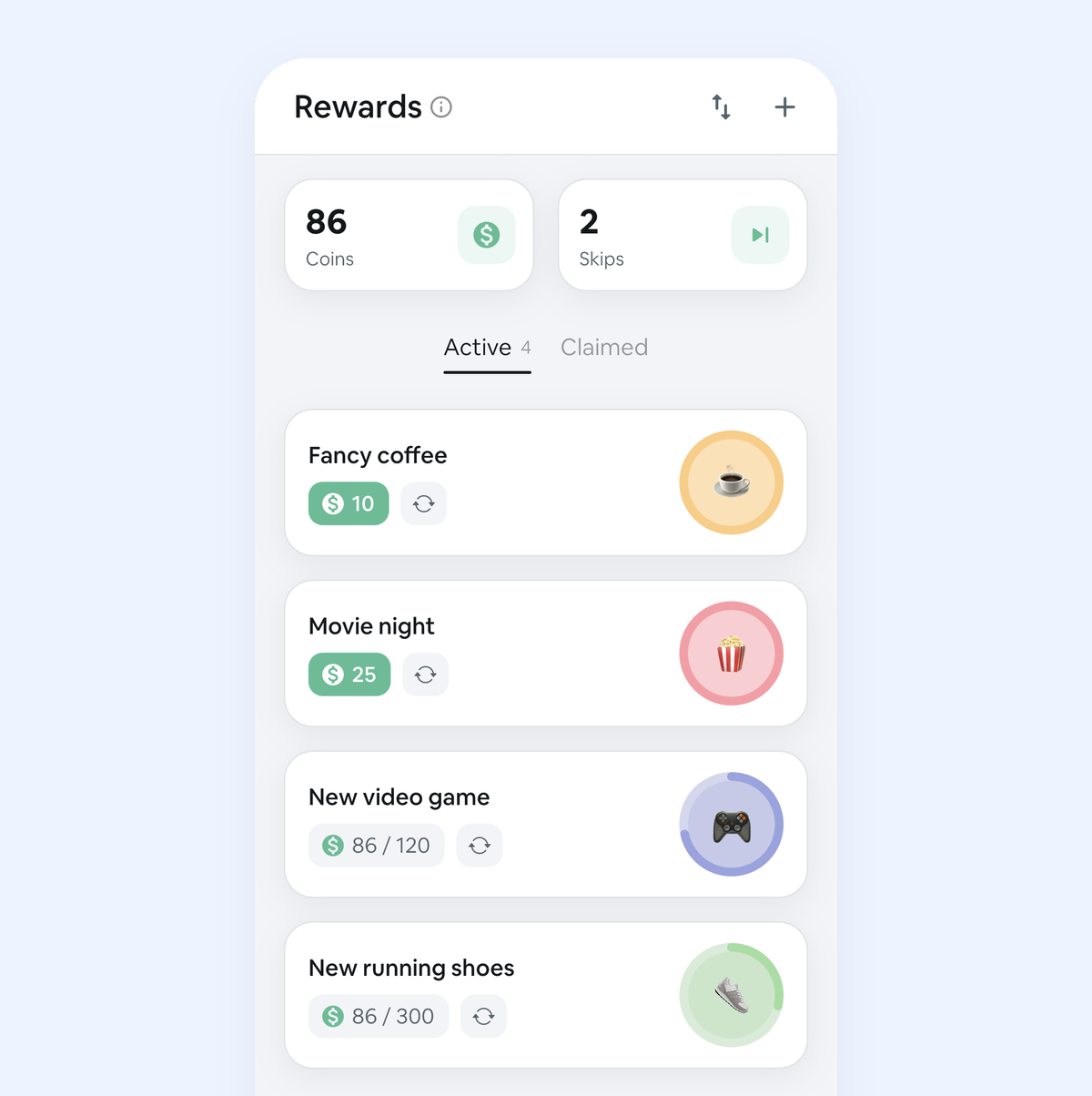
This one’s ours, and it works the other way round. Instead of blocking TikTok, you make it a reward. You write a list of rewards, like “30 minutes of TikTok”, “an evening of gaming” or “a YouTube night”, and give each one a coin price. Your habits pay coins each time you check them off, by how hard they are (1, 4, 8 or 16): studying, a workout, the dishes. When your balance covers the reward, you claim it and enjoy it without guilt.
If you need a day off, a Skip costs 10 coins and keeps your streak alive. It’s on iPhone and Android, free for three habits and three rewards, with a Pro subscription for more.
Good for: people who don’t want to quit their apps, just to stop using them first.
Less good if: you need something that physically stops you. Habit Rewards doesn’t block anything; pair it with ScreenZen or your phone’s limits. Prefer paper, or an app that locks your apps until you’ve earned them (Unrot, Pushscroll)? Our free earn your screen time chart has both, and apps like Unrot compares what the lock apps cost.
How to pick
If it’s the price, try ScreenZen first. If you want to stay in control without a wall, one sec. If you also need to focus for long stretches, Forest. If you haven’t tried your phone’s own limits yet, start there. And if banning your favorite apps never lasts, turn them into rewards you earn: that’s what Habit Rewards is for. A blocker and a reward system work fine side by side.
Going further? Our dopamine detox plan is a gentler week-long reset.
FAQ
Is there a free app like Opal? Yes. ScreenZen is free, with optional tips as its only purchases, and it can delay, limit and strictly block apps. Forest’s free version also blocks apps on a schedule. And your phone’s Screen Time (iPhone) or Digital Wellbeing (Android) costs nothing.
How much does Opal cost? Opal is free to download. Its paid plans in the US App Store include $19.99 a month and $99.99 a year, plus weekly plans (checked October 26, 2026).
Is Opal on Android? Yes, Opal is on Google Play. ScreenZen, one sec, ClearSpace, Forest and Habit Rewards are on Android too.
Is there an app that lets me earn screen time? Habit Rewards: habits pay coins, and you can put screen time on your reward list (“30 minutes of TikTok”, “a gaming evening”) at a coin price you choose. It doesn’t block apps, so it pairs well with a blocker.
Habit Rewards is free on iPhone and Android. Opal is made by Opal OS Corporation; we’re not affiliated with it or with the other apps mentioned.
✅ Try Habit Rewards: the habit tracker that pays you
Every habit pays coins by how hard it is (1, 4, 8 or 16). Write your own reward list, put a coin price on each treat, and claim it once you've earned it.
- Daily, weekly and monthly habits, plus one-off tasks that pay coins
- Reminders, streaks and home-screen widgets
- A 10-coin Skip for the days you can't
- Free for three habits, on iPhone and Android
On a computer? Scan the code with your phone (it opens the App Store or Google Play), or get it on the App Store.
Using Notion?
Start with our free Notion habit tracker and formulas, or get the aesthetic Notion Habit Tracker template with heatmaps and streaks.
More articles you may be interested in:
- Free Notion Habit Tracker Templates (and How to Build Your Own)
- Trigger, Behavior, Reward: The Habit Loop Explained With Examples
- Rewards for Achieving Goals: 80 Ideas, Sized to the Goal
- How to Reward Yourself Without Spending Money (and for Saving It)
- Non-Food Rewards for Adults: 75 Ideas (and How to Stop Rewarding Yourself with Food)
- How to Reward Yourself for Hard Work: 50 Ideas by Effort
Rather track it on your phone? In Habit Rewards every check-off earns coins, and you spend them on rewards you set yourself. Free on iPhone and Android for up to 3 habits.
Get the appFree habit tools and printables
Free, in your browser, no sign-up.