
Todoist doesn’t have a habit tracker built in. It’s a to-do list, and a very good one. But a lot of people already live in it, and adding a second app just for habits feels like one app too many. The good news: with recurring tasks, a filter and Todoist’s daily goals you can get a working habit setup in about ten minutes. The catch is what Todoist can’t tell you about a habit, which we’ll cover at the end.
Everything below comes from Todoist’s own help center (October 2026). Recurring dates work on every plan, including the free Beginner plan.
Step 1: Make each habit a recurring task
Type the habit with a recurring date in the task name, and Todoist picks it up:
| Type | You get |
|---|---|
Read 10 pages every day |
A task that comes back every day |
Gym every mon, wed, fri |
Monday, Wednesday and Friday |
Meditate every day at 7am |
Every day, with a time (add a reminder for a nudge) |
Call home every! 7 days |
Seven days after you last did it, not on a fixed weekday |
The difference between every and every! matters for habits. every repeats from the original date: miss Tuesday’s run and it still comes back on the schedule. every! repeats from the day you complete it: right for “about once a week” habits where the gap is what counts, like watering plants or calling a friend.
One quirk: if a daily task is overdue and you complete it today, Todoist moves it to tomorrow, not today. So check habits off on the day if you can, or the next one shifts.
Step 2: Keep habits in one place
Put them in a project called Habits, or give each one a label like @habit so they can live in their normal projects. Then make a filter for today’s habits, for example today & @habit, and pin it. That’s your daily habit list, separate from the rest of your to-dos.
Step 3: Turn on goals and streaks (Karma)
Todoist’s Karma gives you points for completing tasks on time. More useful for habits are the goals inside it: open Settings → Productivity and set a daily goal (the default is 5 tasks) and a weekly goal (default 25). The Productivity view then shows how many tasks you’ve done today and this week, and your streak: the number of days or weeks in a row you’ve hit your goal, next to your longest streak.
In the same settings you can choose days off (for example weekends) and turn on Vacation mode, so a planned break doesn’t cost you your streak. Karma also takes points away when tasks are five or more days overdue, which is a gentle push not to let habits pile up.
What Todoist can’t do for habits
This setup works, but it was built for tasks, and it shows in three places:
- No streak per habit. Todoist’s streak counts days you hit your task goal, across everything. It won’t tell you that you’ve read 23 days in a row, or that your run streak broke last Thursday.
- No per-habit history at a glance. You can see completed occurrences of a recurring task in your completed tasks, but there’s no calendar or grid per habit showing which days you did it.
- Habits compete with your to-dos. Your daily goal counts every task. Clearing your inbox can hit the goal on a day you skipped every habit.
If none of that bothers you, stay in Todoist: one app is better than two. If you find yourself wanting to know how each habit is going, that’s the point where a habit app earns its place next to Todoist.
When to add a habit app
A habit tracker does the three things above by design: a streak and a calendar for every habit, and habits kept apart from your to-do list. Ours, Habit Rewards, adds one more thing Todoist’s Karma points don’t: a reward you choose. Every habit pays coins by how hard it is (1, 4, 8 or 16), you price your own rewards in coins, like a coffee out or a new game, and claim one when your balance covers it. Forgot to log yesterday? Check it off from the calendar. Need a day off? Spend 10 coins on a Skip that keeps the streak. It’s on iPhone and Android, free for three habits and three rewards, with a Pro subscription for more. It doesn’t connect to Todoist, so you’d keep to-dos in Todoist and habits in Habit Rewards.
Other options, by what you want: HabitKit for a beautiful year-long grid, Loop if you’re on Android and want everything free, or the full list, grouped by what motivates you. Weighing TickTick instead? It has a habit tab built in: here’s what it covers for free. On an iPhone and want to stay in Apple’s apps? See Apple Reminders as a habit tracker.
Whichever way you go, start with two or three habits, not ten. Need ideas? Here are 100 habit tracker ideas, each with a suggested coin value. Prefer a spreadsheet? Try our free habit tracker spreadsheet.
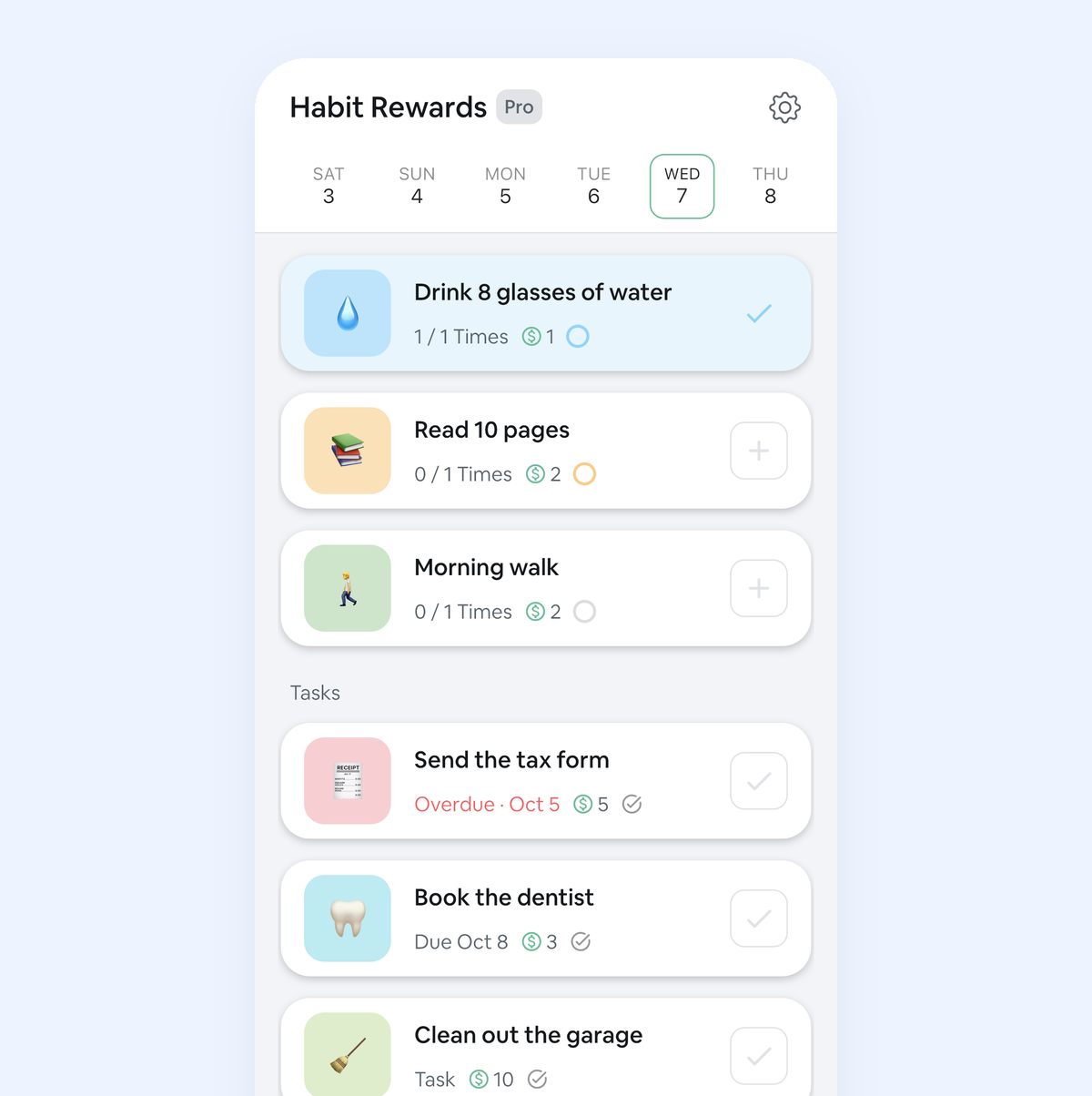
Habit Rewards is free on iPhone and Android. Todoist is a product of Doist; we’re not affiliated with it. Todoist features as described in its help center on October 25, 2026.
✅ Try Habit Rewards: the habit tracker that pays you
Every habit pays coins by how hard it is (1, 4, 8 or 16). Write your own reward list, put a coin price on each treat, and claim it once you've earned it.
- Daily, weekly and monthly habits, plus one-off tasks that pay coins
- Reminders, streaks and home-screen widgets
- A 10-coin Skip for the days you can't
- Free for three habits, on iPhone and Android
On a computer? Scan the code with your phone (it opens the App Store or Google Play), or get it on the App Store.
Using Notion?
Start with our free Notion habit tracker and formulas, or get the aesthetic Notion Habit Tracker template with heatmaps and streaks.
More articles you may be interested in:
- Free Notion Habit Tracker Templates (and How to Build Your Own)
- Trigger, Behavior, Reward: The Habit Loop Explained With Examples
- TickTick Habit Tracker: Is It Free, and Is It Enough?
- (Not Boring) Habits for Android? 4 Apps That Feel the Same
- Apple Reminders as a Habit Tracker: A 10-Minute Setup (and Its Limits)
- Streaks App Alternatives: Is Streaks Worth $5.99, and 4 Free Picks for iPhone
Rather track it on your phone? In Habit Rewards every check-off earns coins, and you spend them on rewards you set yourself. Free on iPhone and Android for up to 3 habits.
Get the appFree habit tools and printables
Free, in your browser, no sign-up.