
TickTick is one of the best-rated to-do apps around: 4.9 stars from more than 46,000 US App Store ratings, and 4.6 from more than 160,000 reviews and over 10 million downloads on Google Play. Tucked inside it is a habit tracker, which is why so many people ask whether they need a separate habit app at all.
Short answer: TickTick’s habit tracker is free for up to five habits. TickTick’s own store listing puts “add more than 5 habits” among the Premium features, alongside things like more lists, more reminders per task and calendar subscriptions.
How to turn it on
Habits live in their own tab. If you don’t see it, TickTick’s listing says what to do: enable Habit in the tab bar. Then add a habit (meditation, exercise, reading) and give it a goal, so TickTick can track it against a target rather than just a tick.
Because it’s TickTick, your habits sync everywhere the rest of your tasks do: iPhone, Android, Wear OS, the web, Mac and PC.
Who it suits
TickTick’s habit tracker is a good fit if:
- You already plan your day in TickTick. Habits sit next to your tasks, calendar and Pomodoro timer, so there’s one app to open in the morning.
- You track five habits or fewer. For a short list, the free plan covers it.
- You want it on a smartwatch or a computer. Not every habit app runs on Wear OS, the web, Mac and PC.
Where it falls short
- The five-habit cap. Past five, you’re paying for Premium, which makes sense if you use TickTick’s other Premium features and less if habits are all you need.
- Habits are one tab among many. TickTick is a planner first. If the to-do list is what you open the app for, the habit tab is easy to forget.
- Nothing to work toward. Like most trackers, TickTick shows you what you’ve done. If a streak alone stops motivating you after a few weeks, it doesn’t offer anything else.
Three habit apps to pair with it, or use instead
| If you want… | Try |
|---|---|
| Unlimited habits for free, on Android | Loop Habit Tracker |
| A grid that shows each habit’s whole year | HabitKit |
| A reward you earn for keeping at it | Habit Rewards |
Loop Habit Tracker is free with no habit limit, no ads and nothing to buy, and it’s open source; each habit gets a strength score that grows with every repetition, so one missed day doesn’t erase months. It’s Android only.
HabitKit turns each habit into a year-long grid of tiles and handles goals like “3 times a week”. It’s free for four habits, with Pro as a subscription or a one-time purchase, on iPhone and Android.
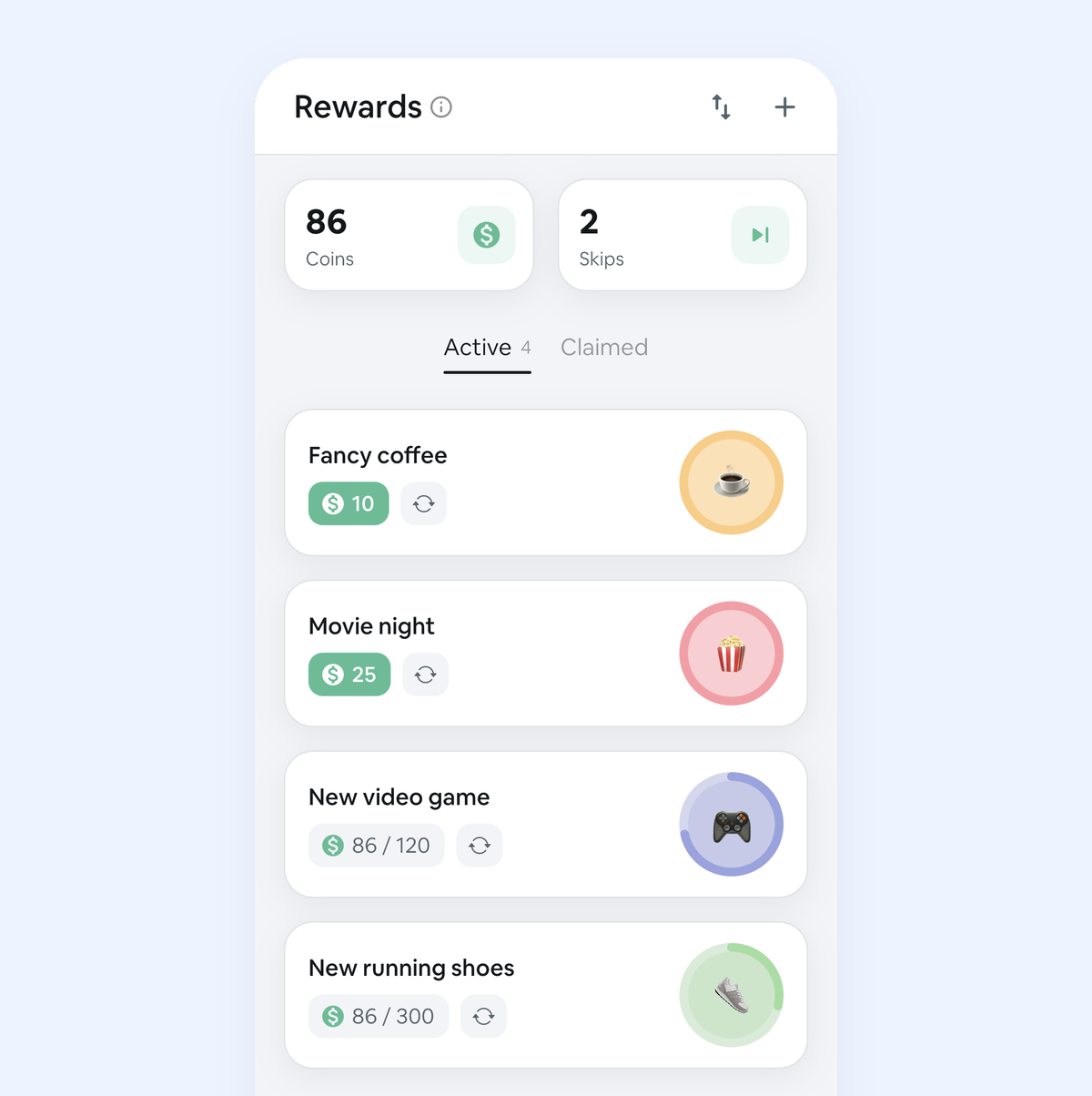
Habit Rewards is ours. Every habit pays coins by how hard it is (1, 4, 8 or 16), you write your own rewards with a coin price, like a coffee out or a new game, and claim one when your balance covers it. Forgot to log yesterday? Check it off from the calendar. Need a day off? A 10-coin Skip keeps your streak. It’s on iPhone and Android and free for three habits and three rewards, so for a pure count of free habits TickTick’s five is more; what we add is the reward.
Which one?
If you live in TickTick and track a handful of habits, stay: it’s free and it’s already open. If you want more than five habits without paying, Loop (Android) or HabitKit’s free four are worth a look. And if your habits keep fading after the first few weeks, try putting a reward at the end of them: that’s what Habit Rewards is for.
Using Todoist instead? See how to track habits in Todoist. Need ideas? Here are 100 habit tracker ideas, each with a suggested coin value. The whole field, grouped by what motivates you: the best habit tracker apps.
Habit Rewards is free on iPhone and Android. TickTick is a product of its own developer; we’re not affiliated with it or with the other apps mentioned. TickTick’s features and limits as stated in its App Store and Google Play listings, and ratings as shown there, on October 25, 2026.
✅ Try Habit Rewards: the habit tracker that pays you
Every habit pays coins by how hard it is (1, 4, 8 or 16). Write your own reward list, put a coin price on each treat, and claim it once you've earned it.
- Daily, weekly and monthly habits, plus one-off tasks that pay coins
- Reminders, streaks and home-screen widgets
- A 10-coin Skip for the days you can't
- Free for three habits, on iPhone and Android

On a computer? Scan the code with your phone (it opens the App Store or Google Play), or get it on the App Store.

Using Notion?
Start with our free Notion habit tracker and formulas, or get the aesthetic Notion Habit Tracker template with heatmaps and streaks.
More articles you may be interested in:
- Free Notion Habit Tracker Templates (and How to Build Your Own)
- Trigger, Behavior, Reward: The Habit Loop Explained With Examples
- Todoist Habit Tracker: How to Track Habits in Todoist (and Its Limits)
- (Not Boring) Habits for Android? 4 Apps That Feel the Same
- Apple Reminders as a Habit Tracker: A 10-Minute Setup (and Its Limits)
- Streaks App Alternatives: Is Streaks Worth $5.99, and 4 Free Picks for iPhone
Rather track it on your phone? In Habit Rewards every check-off earns coins, and you spend them on rewards you set yourself. Free on iPhone and Android for up to 3 habits.
Get the appFree habit tools and printables
Free, in your browser, no sign-up.