
A no buy year is twelve months of not buying the few things you overspend on, while life otherwise goes on as normal: rent, bills, groceries and getting to work stay paid. It’s an old idea (Ann Patchett wrote about her “year of no shopping” in The New York Times in 2017, and Cait Flanders’ book The Year of Less came out in 2018) that comes back every January, most recently as “no buy 2025” and “no buy 2026” on TikTok and Reddit’s r/nobuy.
This guide covers the rules most people use, the gentler low-buy version, a free one-page template for 2027 and a tracker that starts on January 1.
Download the No Buy Year 2027 template (PDF, US Letter, prints on A4) → One page: your three lists, a box for each month, reward months, a want list and the year’s totals.
The rules
There’s no official version. You write your own before January 1, in three lists:
Not buying in 2027 (the categories you overspend on)
- Clothes, shoes and accessories
- Books (use the library or what’s already on the shelf)
- Beauty and skincare beyond replacing what runs out
- Home decor, candles, kitchen gadgets
- Tech, games and in-app purchases
Still buying (essentials, with a limit where you need one)
- Rent, bills, insurance and debt payments
- Groceries and household basics, from a list
- Medicine and anything health-related
- Transport, work and school costs
- Experiences you decide to keep (one meal out a month, a trip you’ve planned)
Exceptions
- Replacing something that’s worn out or broken (one in, one out)
- Gifts you’ve planned, with a budget
- Anything a doctor, employer or school requires
Two habits keep the year going:
- Use up, then replace. Shampoo, notebooks and phone cases get replaced when the old one is finished, not when a new one looks nicer.
- Keep a want list. Write down anything you want with the price and the date. If you still want it on January 1, 2028, buy it then. Most of the list won’t last that long.
A low buy year, if no buy is too much
A low buy year keeps the categories but caps them. Pick one of these per category:
- A monthly budget: say $30 a month for clothes, with unused money rolling over
- One in, one out: a new item only when you give one away
- A planned list: five things you’ll buy this year, written down now
- A waiting rule: 30 days on the want list before anything over $50
If you’ve never done a spending challenge, start with low buy or with a single month. The No Spend November guide, No Spend January and the 30-day no-spend printable are a good trial run before January.
A template for 2027
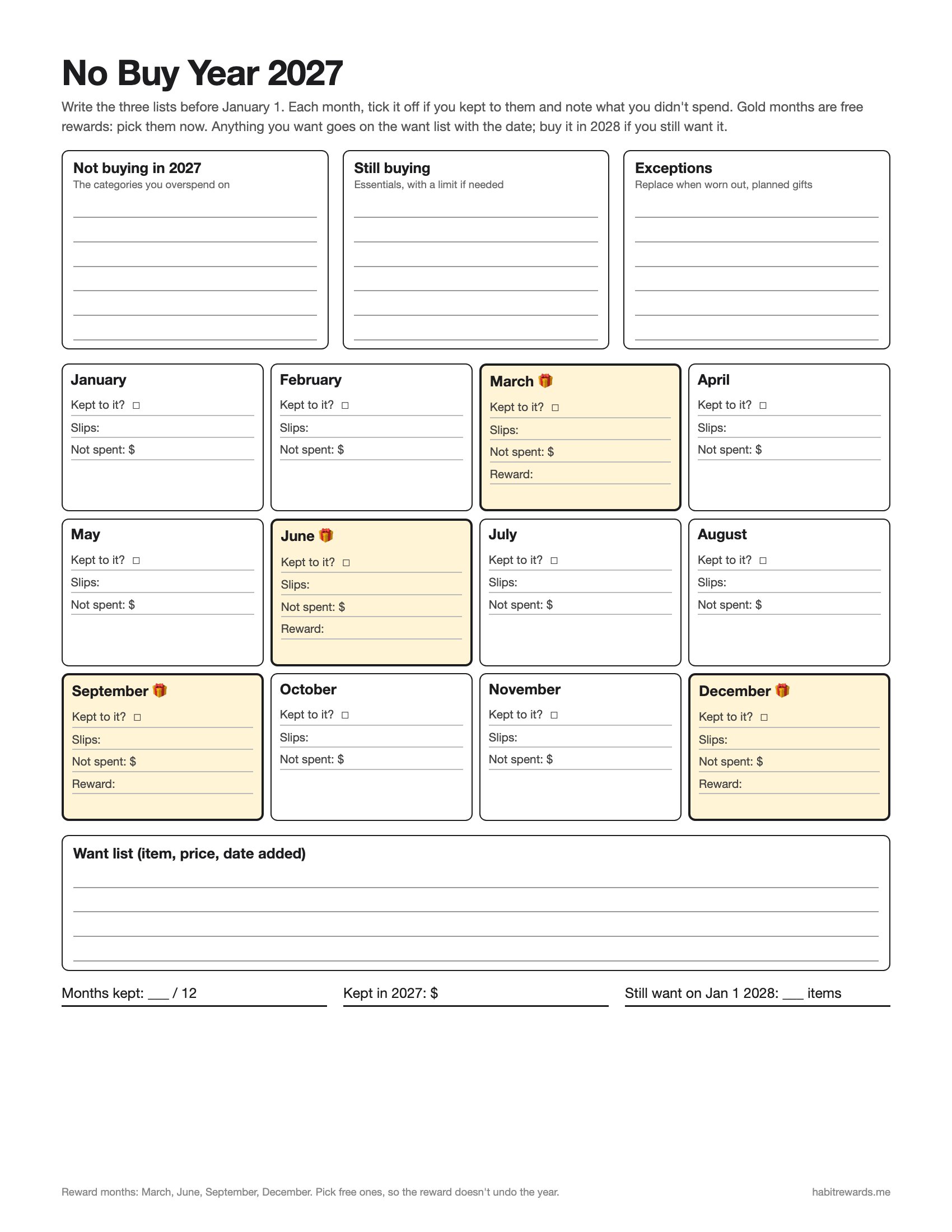
Download the No Buy Year 2027 template (PDF) → At the end of each month, tick the box if you kept to your lists, note any slips and write what you didn’t spend.
Prefer to tap a calendar? Open the tracker set to a no-buy year from January 1, 2027: write your lists, tap each day you kept to them, and it counts your longest run and the money kept. It saves in your browser, no sign-up.
How much can a no buy year save?
Add up what you spent last year on the categories you’re stopping (your bank or card statements will show it). Then:
| Spent a month on those categories | Kept over 2027 |
|---|---|
| $50 | $600 |
| $100 | $1,200 |
| $150 | $1,800 |
| $250 | $3,000 |
Moving it somewhere you can see helps: the 52 week savings challenge printable or the debt payoff tracker give the money a job.
Free rewards along the way
A year is long, and a reward that’s a shopping trip undoes it. Plan free ones for the end of each quarter (the gold months on the template):
- End of March: a day trip somewhere you’ve never been, with a packed lunch
- End of June: a swap party with friends for clothes or books
- End of September: a full day off with nothing planned
- End of December: look at the want list together with what you kept, and choose one thing from it
Sixty more in how to reward yourself without spending money.
When you slip
Write it in that month’s box and keep going. One purchase doesn’t cancel the months before it. Look at what caused it (a sale email, a bad day, a friend’s plan) and add a rule for it, like unsubscribing or deleting a shopping app. The year is judged on the twelve months, not on one afternoon.
Track it on your phone
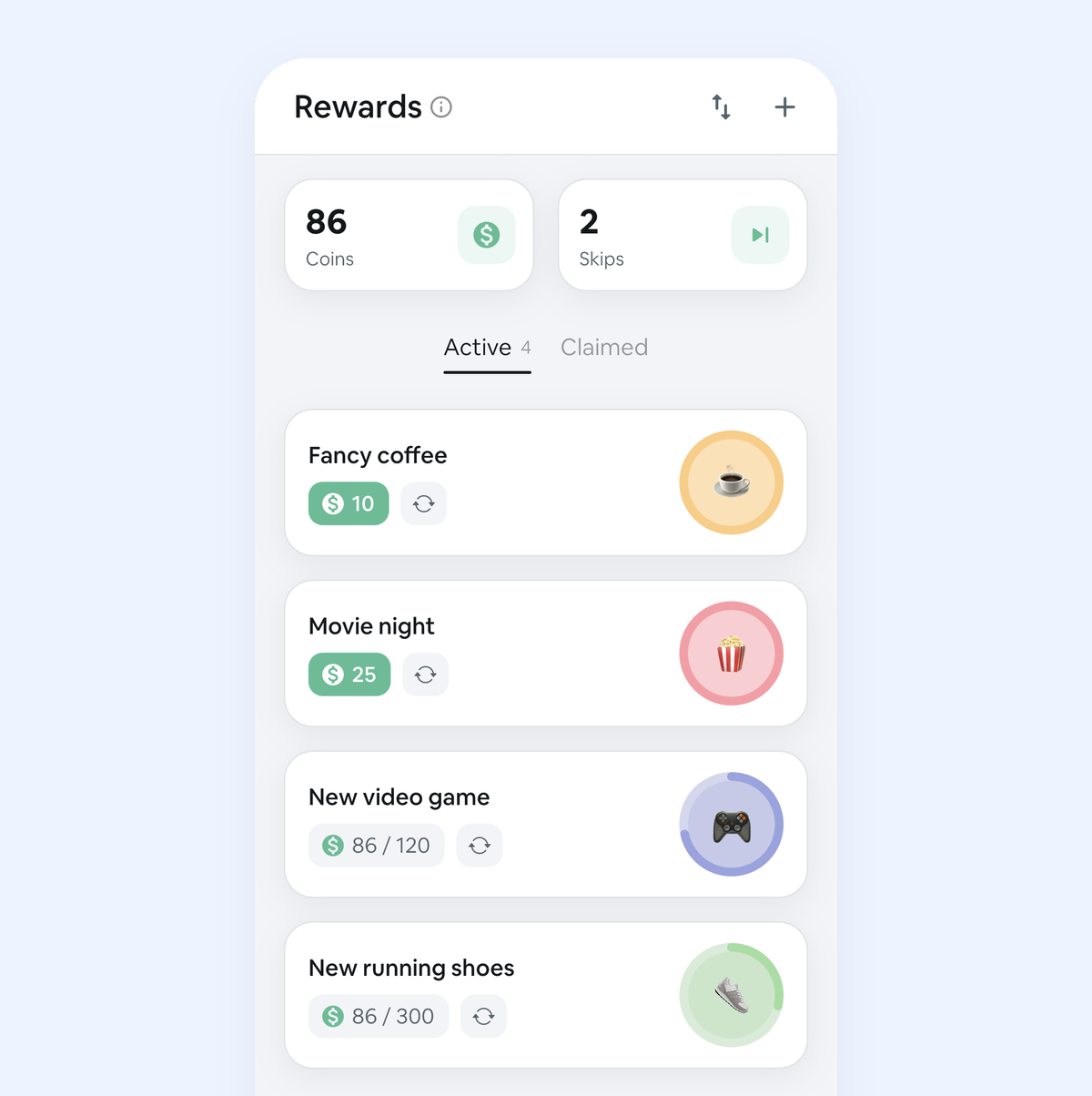
In our app, Habit Rewards, add “No-buy day” as a daily habit and check it off each evening you kept to your lists. Each check-off pays coins, the app keeps your streak and reminds you, and you spend the coins on rewards you write and price yourself, which is where the free rewards above go. It’s free for three habits and three rewards on iPhone and Android.
Other January plans: the Dry January tracker and realistic New Year’s resolutions.
FAQ
What is a no buy year? Twelve months in which you stop buying the categories you overspend on (often clothes, books, beauty, decor or gadgets) while still paying for essentials like rent, bills, groceries and transport. You write the lists before you start, so you never decide at the till.
What are the rules of a no buy year? You set them. Most people write three lists: what they won’t buy, what they still buy (sometimes with a limit), and a few exceptions such as replacing something that wears out or planned gifts. Anything you want that isn’t allowed goes on a want list with the date.
What is the difference between a no buy and a low buy year? A no buy year stops whole categories. A low buy year keeps them but caps them: a monthly budget, one in and one out, or a short list of planned purchases. Low buy is easier to finish if you’ve never done a spending challenge.
Is there a no buy year template? Yes: the free one-page No Buy Year 2027 PDF has the three lists, a box for every month with reward months in March, June, September and December, a want list and year totals. The online tracker can also run a 365-day no-buy year from January 1.
What if I slip during a no buy year? Write it in that month’s box and keep going. One purchase doesn’t cancel the months before it. Look at what caused it and add a rule, then make the next day a normal no-buy day.
✅ Try Habit Rewards: the habit tracker that pays you
Every habit pays coins by how hard it is (1, 4, 8 or 16). Write your own reward list, put a coin price on each treat, and claim it once you've earned it.
- Daily, weekly and monthly habits, plus one-off tasks that pay coins
- Reminders, streaks and home-screen widgets
- A 10-coin Skip for the days you can't
- Free for three habits, on iPhone and Android
On a computer? Scan the code with your phone (it opens the App Store or Google Play), or get it on the App Store.
Using Notion?
Start with our free Notion habit tracker and formulas, or get the aesthetic Notion Habit Tracker template with heatmaps and streaks.
More articles you may be interested in:
- Free Notion Habit Tracker Templates (and How to Build Your Own)
- Trigger, Behavior, Reward: The Habit Loop Explained With Examples
- Rewards for Achieving Goals: 80 Ideas, Sized to the Goal
- How to Reward Yourself Without Spending Money (and for Saving It)
- Non-Food Rewards for Adults: 75 Ideas (and How to Stop Rewarding Yourself with Food)
- No Spend January 2027: Rules, a Printable Calendar and a Free Tracker
Rather track it on your phone? In Habit Rewards every check-off earns coins, and you spend them on rewards you set yourself. Free on iPhone and Android for up to 3 habits.
Get the appFree habit tools and printables
Free, in your browser, no sign-up.