
A to-do list has a built-in problem: it never pays out. You cross something off, and three new things take its place. Nothing builds up that you can see, so the list starts to feel like a record of what you haven’t done.
Gamified to-do list apps try to fix that by giving every finished task a payoff. But the payoff is very different from app to app, and that difference decides whether it still works in a month. So here are six, grouped by what a finished task actually gets you. One of them is ours, Habit Rewards; we’ve tried to describe the others the way their own users would.
At a glance
| App | A finished task gets you | Spend it on rewards you choose? | Platforms | Price |
|---|---|---|---|---|
| Habitica | Gold and XP for your avatar | Yes: your own rewards, bought with Gold | Web, iPhone, Android | Free; optional subscription from $4.99/month |
| LifeUp / ulives | Coins and XP for skills you define | Yes: a shop you stock and price | Android (LifeUp), iPhone (ulives) | LifeUp $4.99 once; ulives free with a $9.99 Premium upgrade |
| Todoist | Karma points and levels | No | Web, iPhone, Android, desktop | Free; Pro $5/month billed yearly |
| Finch | Energy and Rainbow Stones for your pet | Only items for the pet | iPhone, Android | Free; optional Finch Plus |
| Do It Now | XP and gold | Yes: rewards you add, priced in gold | Android | Free with ads |
| Habit Rewards | Coins (1, 4, 8, 16 or your own number) | Yes: rewards you price yourself | iPhone, Android | Free for three habits; optional Pro |
Prices are the US list prices on 2026-10-17.
Points you watch vs points you spend
There are two kinds of game reward, and they wear off at different speeds.
- Points you watch: a score, a level, a karma number. It feels good for a week. Then level 12 feels the same as level 11, because there’s nothing to do with it.
- Points you spend: gold, coins, a currency. Every task moves you closer to something specific, and spending it is a moment you look forward to. The reward is what keeps the score meaningful.
If you’ve tried a gamified app before and it faded, check which kind it was. Most people who stick with one end up on the second kind.
1. Habitica: the RPG
Habitica turns your to-dos, dailies and habits into a role-playing game. Finishing a to-do gives you Gold and experience for your pixel-art avatar, and you spend the Gold on gear, or on your own rewards: you can add personal treats to the Rewards column and buy them like anything else. Unfinished to-dos slowly turn red, and the redder a task gets, the more it pays when you finally do it. Missing a to-do’s due date doesn’t cost health; only missed dailies and bad habits do. Free, with an optional subscription.
Good for: people who like RPGs, and anyone who wants friends in a party keeping them honest.
Less good if: you want a plain list. There’s a whole game around it, and that’s either the point or the problem.
2. LifeUp (Android) and ulives (iPhone): the sandbox
LifeUp treats your life as a game you design. Tasks pay coins and experience toward skills you create, and you build your own shop: you set each reward’s price, how many are in stock and what it does. There are loot boxes, crafting and custom achievements too. On Android it’s a one-off $4.99 with no subscription. On iPhone the same team’s app is called ulives, free with a Premium upgrade.
Good for: people who enjoy building systems and want every rule to be their own.
Less good if: you want to be up and running in two minutes. All that freedom means a lot of settings.
3. Todoist: karma, not currency
Todoist is a serious to-do app first, with a light game layer called Karma. You earn points for completing tasks on time, hitting daily and weekly goals and keeping streaks, and you lose some for tasks more than five days overdue. Points move you up eight levels, from Beginner to Enlightened. There’s nothing to spend them on, though: Karma is a score you watch, not a currency.
Good for: people who want a powerful task manager with a small nudge, not a game.
Less good if: a number going up stopped motivating you a long time ago.
4. Finch: the pet
Finch is a self-care app with a small bird you look after. Completing your goals earns energy for its adventures, or Rainbow Stones you spend on clothes and furniture for it. It’s gentle by design and leans on check-ins and reflection as much as tasks. The rewards stay inside the app, though: you can’t set real-life treats. Free, with an optional Finch Plus subscription.
Good for: soft daily goals, and anyone who responds better to kindness than to pressure.
Less good if: you want to reward yourself with real things, or run a long work to-do list.
5. Do It Now: RPG To Do List (Android)
Do It Now is a to-do list dressed as an RPG. Tasks are tied to skills and characteristics you set up, and finishing them gives you experience, levels and gold. You spend the gold on rewards you add yourself, like “watch a movie” for 100 gold. Free with ads, Android only.
Good for: Android users who want XP, levels and a self-made reward list in one place.
Less good if: you’re on iPhone, or ads bother you.
6. Habit Rewards: coins for tasks and habits, spent on real treats
This one is ours. It keeps the part of a game that works for most people, getting paid, and drops the rest: no avatar, no damage. A one-off task pays the coins you give it (1, 4, 8 or 16, or your own number), and so does every habit. You make a list of real rewards, like a coffee out, a takeaway night or a guilt-free gaming evening, each with a coin price, and claim one when your balance covers it. Tasks can have a due date and a reminder, and an overdue task stays on today’s list until it’s done. It’s on iPhone and Android, free for three habits, with an optional Pro subscription. Tasks don’t count toward the three.
Good for: people who already treat themselves and want the treat to be earned, and anyone whose to-dos and habits should pay into one balance.
Less good if: you need projects, subtasks or team sharing. It’s a personal list, not a project manager.
How to pick
Ask what made you finish things on your best days. If it was other people, go social: Habitica’s party. If it was building the system, LifeUp. If you only want a nudge inside a real task manager, Todoist. If it was looking after something, Finch. And if it was the treat at the end, pick an app where the points buy something you choose: Habitica’s custom rewards, LifeUp, Do It Now or Habit Rewards.
How to gamify any to-do list
You don’t need an app to start. The same rules work on paper or in the list app you already use.
- Price tasks by dread, not size. The task you keep moving to tomorrow pays the most. “Call the dentist” takes five minutes, but if you’ve been avoiding it for a month, make it worth 16 coins.
- Keep three to five tasks on today’s list. A long list is a list of things you’ll fail at. Move the rest to “later” and pull them in when today’s are done.
- Make one task the boss. Each week, pick the job you’ve avoided longest, give it the biggest payout, and do it first thing one morning.
- Pay for starting. For a big task, the first 10 minutes earn the points. Most days you’ll keep going once you’ve started.
- Stock a reward menu. Write down rewards you actually want and price them in the same points: a coffee out for about a day’s tasks, a takeaway night for a good week, something bigger for a month. Need ideas? Here are 70 ways to reward yourself.
- Pay first, then claim. No rewards on credit. If the balance doesn’t cover it, it isn’t earned yet.
Here’s what a week’s prices can look like:
| Task | Coins |
|---|---|
| Reply to the email you’ve been avoiding | 4 |
| Book the dentist | 8 |
| Do the tax form | 16 |
| Clear the downloads folder | 1 |
| Return the parcel | 4 |
| Reward | Price |
|---|---|
| A fancy coffee | 10 coins |
| An evening of your game, no guilt | 20 coins |
| A takeaway night | 40 coins |
| The book or gadget on your wish list | 150 coins |
For recurring routines rather than one-off jobs, the same idea works as a reward chart for adults, and the bigger picture is in how to gamify your life.
Doing it in Habit Rewards
Habit Rewards runs this system for you. Tap + on the home screen, choose Create a task, and give it a coin value (1, 4, 8 or 16, or your own number) and, if you like, a due date and a reminder. It sits on today’s list until it’s done, overdue or not, and when you check it off the coins go to the same balance as your habits. You spend that balance on rewards you price yourself.
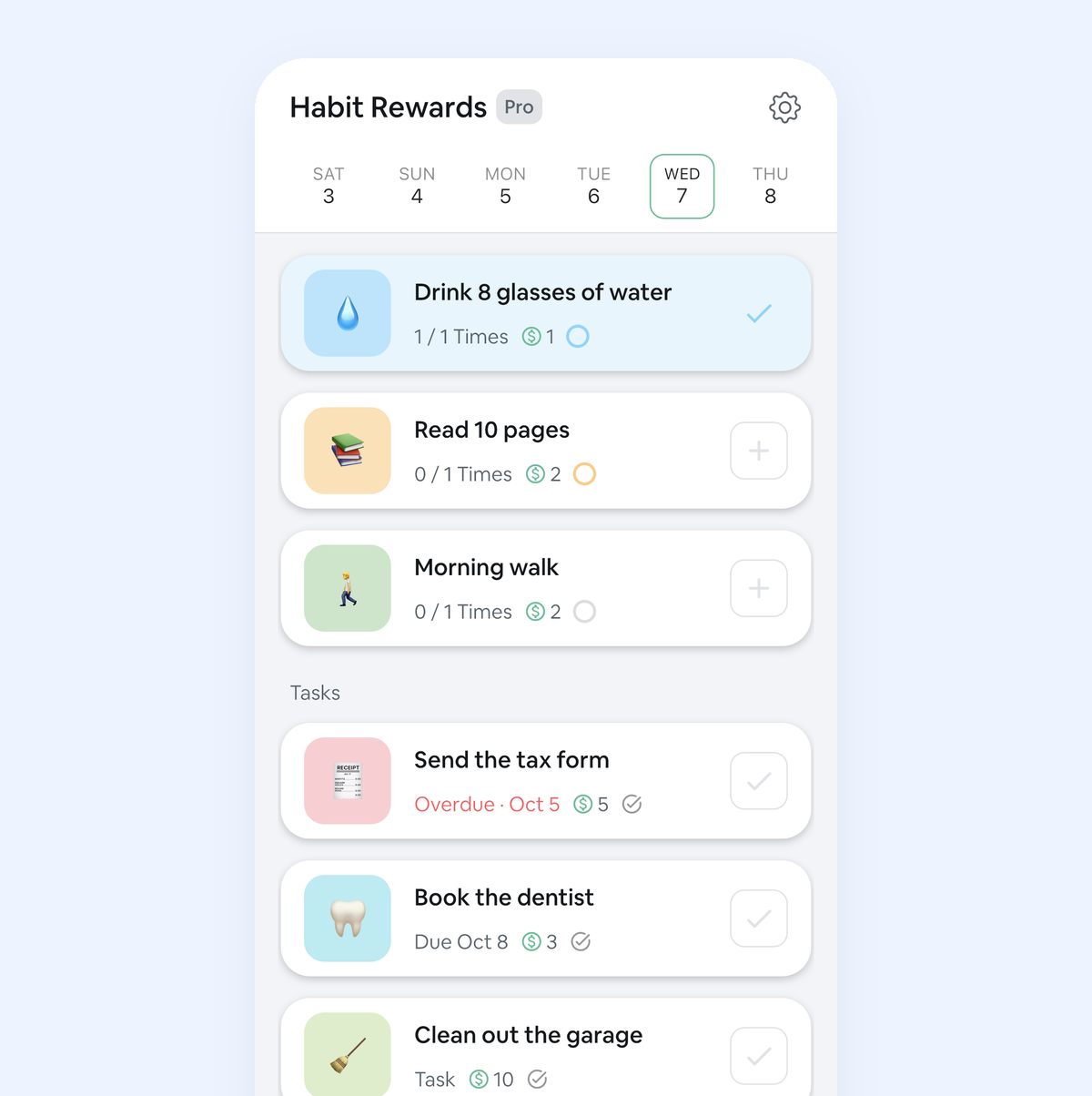
Tasks don’t count toward the free plan’s three habits, so you can try the whole loop for free on iPhone and Android.
FAQ
What is a gamified to-do list? A to-do list that gives you something for each finished task: points, experience, coins or progress for a character. The good ones also give those points a use, like a shop of rewards, so the score keeps meaning something.
Is there a to-do list app that rewards you with real rewards? Apps can’t buy you a coffee, but some let you set the rewards yourself and price them in points you earn. Habitica’s custom rewards, LifeUp’s shop and Habit Rewards’ reward list all work that way. You decide what each reward costs and claim it when you’ve earned enough.
Does gamifying tasks help with ADHD? Many people with ADHD find a quick, visible payoff makes it easier to start a task. It isn’t a treatment, but it can help routines stick. Our ADHD habit tracker guide has a setup built for that.
How many points should a task be worth? Use a few fixed levels so you don’t have to think about it, for example 1, 4, 8 and 16. Price the dreaded tasks highest. Then price rewards in days of effort: a small reward about one good day, a big one about a month.
✅ Try Habit Rewards: the habit tracker that pays you
Every habit pays coins by how hard it is (1, 4, 8 or 16). Write your own reward list, put a coin price on each treat, and claim it once you've earned it.
- Daily, weekly and monthly habits, plus one-off tasks that pay coins
- Reminders, streaks and home-screen widgets
- A 10-coin Skip for the days you can't
- Free for three habits, on iPhone and Android
On a computer? Scan the code with your phone (it opens the App Store or Google Play), or get it on the App Store.

Using Notion?
Start with our free Notion habit tracker and formulas, or get the aesthetic Notion Habit Tracker template with heatmaps and streaks.
More articles you may be interested in:
- Free Notion Habit Tracker Templates (and How to Build Your Own)
- Trigger, Behavior, Reward: The Habit Loop Explained With Examples
- How to Reward Yourself for Reading More
- How to Reward Yourself for Cleaning the House
- Tiimo Alternatives: 4 ADHD-Friendly Apps, Picked by What You Need
- How Long Does It Take to Form a Habit? 66 Days, Give or Take Months
Free habit tools and printables
Free, in your browser, no sign-up.