
Habitica gives you three columns for tasks, Habits, Dailies and To Do’s, plus a fourth for Rewards. New players almost always ask the same thing: what’s the difference, and does it matter where a task goes?
It matters a lot. The column decides when a task pays you, and whether it can hurt you: put a hopeful goal in the wrong one and Habitica will punish you for something you were only planning to start. Here is how the three work, with examples, so you can sort your list in five minutes.
The short answer
| Habits | Dailies | To Do’s | |
|---|---|---|---|
| For | Things you do any number of times, on no fixed schedule | Things you want to do on a schedule | Things you only do once |
| Schedule | None | Every day, some weekdays, or every few days, weeks, months or years | Optional due date |
| When you do it | Tap + for Gold and Experience | Check it off for Gold and Experience | Check it off for Gold and Experience, then it’s done |
| When you don’t | A negative Habit (tapping −) costs Health | A missed Daily costs Health at the start of your next day | Nothing. A missed due date never costs Health |
| Colour | Bluer with +, redder with −, drifts back to yellow | Bluer when you keep it up, redder when you miss it | Gets redder the longer it waits |
| Example | Drink water / drink soda | Take medication | Book the dentist |
Habitica’s own one-line version: Habits can be tracked “multiple times per day, or on an unset schedule”, Dailies are “repeated tasks you want to complete on a more structured schedule”, and To Do’s are “one-off tasks”.
Habits: tap as often as it happens
A Habit has no schedule and no checkbox, just buttons. There are three kinds:
- Positive Habits have a + button. Tap it every time you do the thing and you earn Gold and Experience. Example: take vitamins, floss, one hour of studying.
- Negative Habits have a − button. Tap it every time you slip and you lose Health. Example: smoking, doom scrolling, biting your nails.
- Dual Habits have both. Example: drink water (+) vs drink soda (−), study (+) vs procrastinate (−).
A Habit never punishes you for doing nothing. If you ignore a positive or negative Habit it just fades back to yellow over time. That makes Habits the safe column: the right home for anything you’re experimenting with, or anything that happens a different number of times each day.
Dailies: the column that bites
A Daily repeats on a schedule you set: every day, certain weekdays, every few days, or weekly, monthly or yearly. On the days it’s due, you check it off for Gold and Experience. If your day ends and a due Daily is still unchecked, you lose Health. The harder you set a Daily, the more it pays and the more it hurts to miss.
A few things that change how Dailies feel:
- Not every Daily is due every day. A Daily that isn’t due today is greyed out and can’t hurt you. Gym on Monday, Wednesday and Friday is one Daily scheduled for those three days, not a daily Daily you fail four times a week.
- You get one chance to catch up. When you open Habitica after your day has rolled over, it asks you to “check off any Dailies you did yesterday” before your new day starts. That’s for things you did and forgot to tick, not a second chance to do them.
- Your day ends when you say. Custom Day Start in Settings changes the hour your day resets, which helps night owls who keep losing Health at midnight.
- You can pause. “Pause Damage” in Settings stops missed Dailies from costing Health while you’re on holiday or ill. To pause a single Daily, Habitica suggests setting it to repeat every 0 days until you want it back.
- Streaks pay. Every Daily keeps a streak, and a 21-day streak earns an achievement.
To Do’s: one and done
A To Do is a task you do once: schedule an appointment, organise the closet, finish the essay. You can give it a due date and a checklist. Check it off and it pays Gold and Experience and leaves your list.
To Do’s never cost Health, even past their due date. Instead they get redder the longer they wait, and a redder task pays more when you finally do it. So the dreaded job you’ve avoided for two weeks is also your best-paying one.
Which column? Ask four questions
- Will I do this once and be finished? To Do.
- Do I want to do it on certain days, and do I want a penalty if I don’t? Daily.
- Does it happen a different number of times each day, or am I just trying to do more (or less) of it? Habit.
- Is it something I want to stop? A negative Habit, or a dual Habit with the good alternative on the + side.
If you’re unsure between Daily and Habit, start it as a Habit. You can move it to Dailies once you’re actually doing it most days. Moving a hopeful goal straight into Dailies is how Health bars drain.
30 examples, sorted
Habits (+, − or both)
- + Drink a glass of water
- + Take the stairs
- + 10 minutes of tidying
- + Read 10 pages
- + Pomodoro of focused work
- + Step outside for fresh air
- + Say no to something that doesn’t matter
- − Doom scrolling
- − Snacking after dinner
- ± Cook at home / order takeaway
- ± Study / procrastinate
Dailies
- Take medication (every day)
- Brush and floss (every day)
- Make the bed (every day)
- Walk the dog (every day)
- Gym (Mon, Wed, Fri)
- Plan tomorrow (weekdays)
- Water the plants (every 3 days)
- Weekly review (Sunday)
- Pay the bills (monthly)
- Change the bedsheets (every 2 weeks)
To Do’s
- Book the dentist
- Renew passport
- Return the parcel
- Clear out the garage (with a checklist per shelf)
- Finish the essay (due Friday)
- Call the bank about the fee
- Cancel the unused subscription
- Buy a birthday present
- Set up the new phone
The setup mistakes that drain your Health
- Too many Dailies on day one. Ten new Dailies and one bad day is a lot of damage. Start with three to five you’re already mostly doing, and add one a week.
- Goals in the Dailies column. “Meditate 20 minutes” as a Daily on day one is a wish, not a routine. Put it in Habits until it sticks.
- Every-day schedules for every-few-days things. If it’s really three times a week, schedule it for three days.
- Huge To Do’s. “Sort out finances” sits there for months. Break it into To Do’s you can finish in one sitting, or give it a checklist.
- An empty Rewards column. Gold only means something if there’s something you want to buy with it. Add your own rewards, a coffee out, an episode, a new book, and price them so a good day buys a small one. Our list of 70 ways to reward yourself has ideas.
If the damage is the part that doesn’t work for you
Some people love Habitica’s stakes: a party, a boss, Health on the line. Others find that a bad week turns into a dead character and a reason to stop opening the app. If that’s you, the six apps like Habitica we compared are sorted by what motivates you in each.
One of them is ours. Habit Rewards keeps the Gold-and-Rewards half of Habitica and drops the Health bar. The columns map across like this:
| Habitica | Habit Rewards |
|---|---|
| Dailies | Habits that repeat daily, weekly or monthly, with reminders. Each check-off pays 1, 4, 8 or 16 coins, set by how hard it is |
| Missed Daily = lost Health | Nothing is taken away for a day you don’t check off. You can still check off a day you forgot, and a Skip, bought with coins, keeps a streak alive on a day you can’t do it |
| Negative Habits | Quit habits: long-press the box to mark a slip, and you lose coins instead of earning them |
| To Do’s | Tasks: one-offs with coins, an optional due date and reminder; they stay on today’s list until they’re done |
| Rewards column | Your reward list: real treats you write and price in coins, claimed when your balance covers them |
There’s no avatar, no class and no party. If those were your favourite part, stay with Habitica. If the rewards were, side by side is in Habitica vs Habit Rewards.
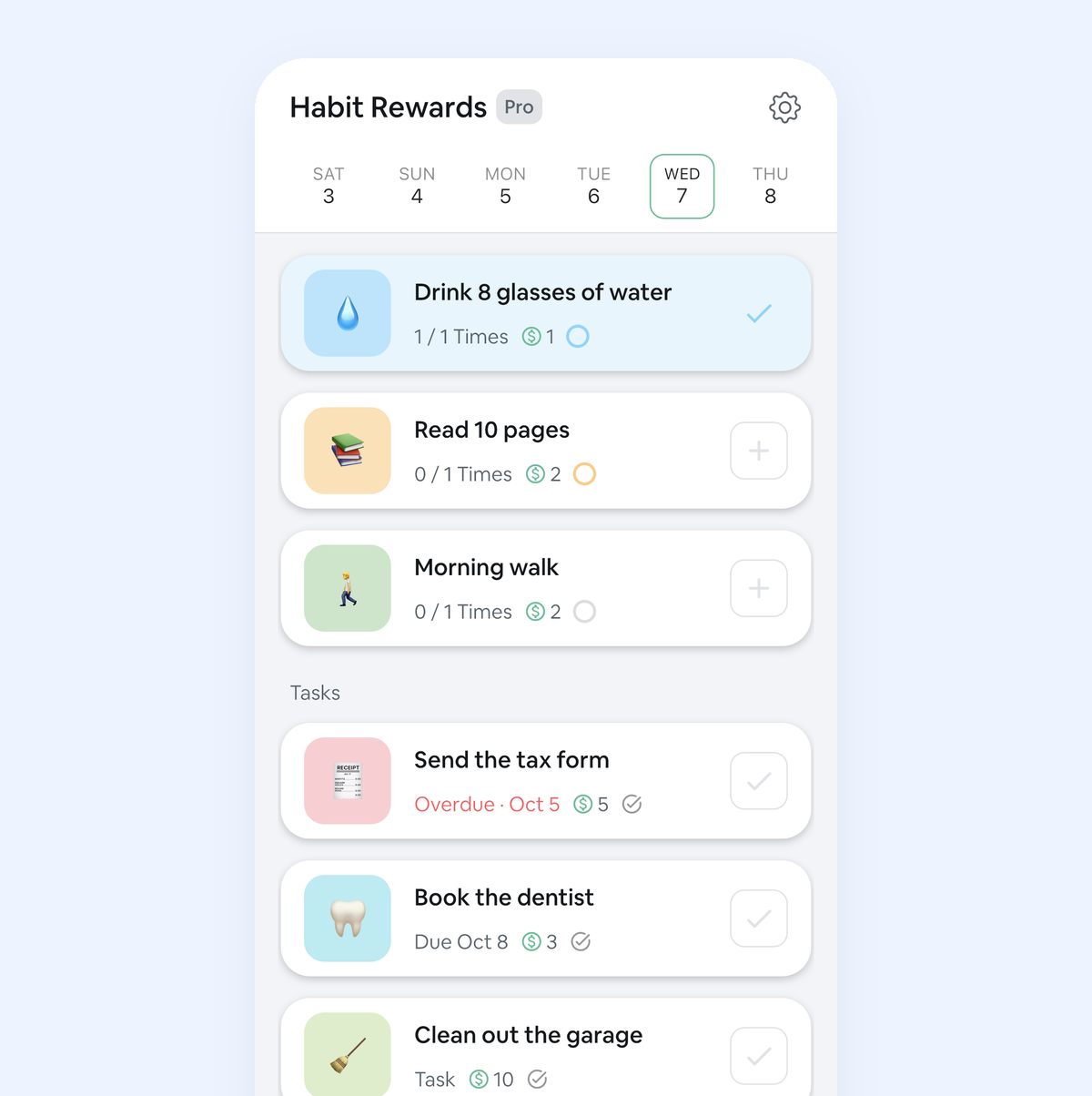
Habit Rewards is free for three habits and three rewards (tasks don’t count) on iPhone and Android.
FAQ
What’s the difference between Habits and Dailies in Habitica? Habits have no schedule: you tap + or − whenever it happens, as often as it happens, and ignoring one never hurts. Dailies have a schedule, and a Daily that’s due and left unchecked costs Health when your day resets.
What’s the difference between Dailies and To Do’s? A Daily comes back on its schedule; a To Do is done once and then leaves your list. Missing a Daily costs Health; missing a To Do’s due date doesn’t, it just gets redder and pays more.
Do To Do’s hurt you in Habitica? No. Habitica says you won’t lose Health if you miss a To Do’s due date. Only missed Dailies and taps on negative Habits cost Health.
How many Dailies should I have? Fewer than you think. Start with three to five you already do most days, then add one at a time. Anything you’re still trying to start belongs in Habits.
How do I stop losing Health while I’m away? Use “Pause Damage” in Settings. To pause one Daily, set it to repeat every 0 days until you’re ready to restart it.
✅ Try Habit Rewards: the habit tracker that pays you
Every habit pays coins by how hard it is (1, 4, 8 or 16). Write your own reward list, put a coin price on each treat, and claim it once you've earned it.
- Daily, weekly and monthly habits, plus one-off tasks that pay coins
- Reminders, streaks and home-screen widgets
- A 10-coin Skip for the days you can't
- Free for three habits, on iPhone and Android
On a computer? Scan the code with your phone (it opens the App Store or Google Play), or get it on the App Store.

Using Notion?
Start with our free Notion habit tracker and formulas, or get the aesthetic Notion Habit Tracker template with heatmaps and streaks.
More articles you may be interested in:
- Free Notion Habit Tracker Templates (and How to Build Your Own)
- Trigger, Behavior, Reward: The Habit Loop Explained With Examples
- Reward Jar Ideas for Adults: How to Set One Up (+ 40 Slips)
- How to Reward Yourself for Weight Loss: 50 Non-Food Rewards
- How to Reward Yourself for Reading More
- How to Reward Yourself for Cleaning the House
Free habit tools and printables
Free, in your browser, no sign-up.